Developer Documentation
Introduction
AidStream SDK is a GStreamer-based real-time multimedia data processing toolkit for building AI-powered video and image analytics applications and services. It provides GStreamer plugins accelerated by hardware backends such as GPU, VPU, and NPU, allowing developers to build and deploy end-to-end multimedia AI applications more quickly, more simply, and with greater flexibility.
AidStream is a video framework for building streaming applications. Its goal is to simplify video-plus-AI application development, especially when custom algorithms need to be inserted into the processing flow.
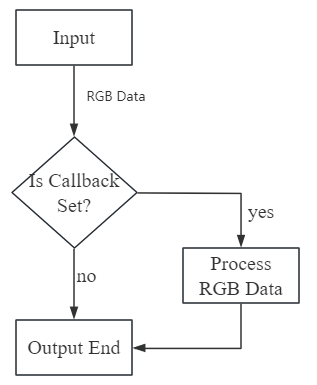
AidStream uses a pipeline-oriented architecture. The pipeline elements are intentionally simple and are divided into input and output stages. After the pipeline starts, the SDK can obtain RGB data between the input and output stages through callback functions. Developers can process the RGB data inside the callback and return the processed frames to the pipeline, after which the frames continue through the downstream output stages.
Version 3 is a major upgrade over the original AidStream release.
The general AidStream workflow is shown below:
Hardware Performance
For detailed performance figures, see Hardware Performance Reference.
Supported Hardware Platforms and Operating Systems
| SoC Platform | Hardware Model | Operating System | GStreamer Plugin Examples |
|---|---|---|---|
| QCS8550 | Rhino Pi X1 / MC940 / FV04 | Ubuntu 22.04 | Plugin Type I |
| QCS8625 | QCS8625 | Ubuntu 22.04 | Plugin Type I |
| QCS6490 | AGC6490 / Rhino Pi A1 | Ubuntu 22.04 / Ubuntu 24.04 | Plugin Type II |
| QCS6490 | Ruisha Pi | AidLux Fusion System (Ubuntu 22.04) | Plugin Type III |
How to Use This Guide
General examples are provided in two forms:
- Reference code based on GStreamer plugin commands: GStreamer plugin examples
- Reference code based on the C++ SDK interface: SDK interface examples
GStreamer Plugin Examples
tip
Placeholder conventions used below:
<input-stream-url>: the input camera or streaming source address. Example:rtsp://admin:aidlux123@192.168.111.236:554/h264/ch1/main/av_stream<output-stream-url>: the target streaming server address. Example:rtsp://admin:aidlux123@192.168.111.115:8554/test-111
After installing the AidStream-GST package, the corresponding model files are located in /usr/local/share/aidstream-gst/example/datas/. Make sure the required model files are present before running the examples.
The directory /usr/local/share/aidstream-gst/example/plugines/gst-plugin-customize is reserved for custom pre-processing and post-processing modules.
Plugin Type I
Plugin Type I Example Index
| Platform | Example |
|---|---|
| QCS8550 / QCS8625 | 1. Object detection (YOLOv5) 2. Object detection (YOLOv8) 3. Segmentation (YOLOv8) |
| QCS8550 (FV04) | 4. H.264 pipeline 5. H.265 pipeline 6. 4-way mosaic composition 7. AI detection with overlay output |
Example 1: YOLOv5 with the AidLite Toolchain
gst-launch-1.0 -e rtspsrc location=<input-stream-url> latency=200 protocols=tcp \
! rtph264depay ! h264parse config-interval=-1 ! qtic2vdec ! qtivtransform engine=2 \
! video/x-raw\(memory:GBM\),format=NV12,width=3840,height=2160,framerate=25/1 ! tee name=t \
t. ! queue ! qtimetamux name=mux \
t. ! queue max-size-buffers=4 max-size-bytes=0 max-size-time=0 \
! qtivtransform engine=2 ! video/x-raw\(memory:GBM\),format=BGR \
! ast-aidlite model=./cutoff_yolov5s_sigmoid_qcs8550_w8a8.qnn236.ctx.bin roi-width=3840 roi-height=2160 box-thresh=0.5 nms-thresh=0.45 ! text/x-raw,format=utf8 ! mux. \
mux.src ! qtioverlay engine=1 ! qtic2venc ! h264parse ! rtspclientsink protocols=tcp location=<output-stream-url>
Example 2: YOLOv8 with the AidLite Toolchain
gst-launch-1.0 -e rtspsrc location=<input-stream-url> latency=200 protocols=tcp \
! rtph264depay ! h264parse config-interval=-1 ! qtic2vdec ! qtivtransform engine=2 \
! video/x-raw\(memory:GBM\),format=NV12,width=3840,height=2160,framerate=25/1 ! tee name=t \
t. ! queue ! qtimetamux name=mux \
t. ! queue max-size-buffers=4 max-size-bytes=0 max-size-time=0 \
! qtivtransform engine=2 ! video/x-raw\(memory:GBM\),format=BGR \
! ast-aidlite model-type=yolov8-detection model=./cutoff_yolov8s_qcs8550_fp16.qnn231.ctx.bin roi-width=3840 roi-height=2160 box-thresh=0.3 nms-thresh=0.3 ! text/x-raw,format=utf8 ! mux. \
mux.src ! qtioverlay engine=1 ! qtic2venc ! h264parse ! rtspclientsink protocols=tcp location=<output-stream-url>
Example 3: YOLOv8 Segmentation with the AidLite Toolchain
gst-launch-1.0 -e \
rtspsrc location=<input-stream-url> latency=200 protocols=tcp \
! rtph264depay ! h264parse config-interval=-1 ! qtic2vdec ! qtivtransform engine=2 \
! video/x-raw\(memory:GBM\),format=NV12,width=3840,height=2160,framerate=25/1 ! tee name=t \
t. ! queue ! qtivcomposer name=mixer1 ! queue ! qtic2venc ! h264parse ! rtspclientsink protocols=tcp location=<output-stream-url> \
t. ! queue max-size-buffers=4 max-size-bytes=0 max-size-time=0 \
! qtivtransform engine=2 ! video/x-raw\(memory:GBM\),format=BGR \
! ast-aidlite-video model-type=yolov8-segmentation model=./cutoff_yolov8s-seg_qcs8550_fp16.qnn236.ctx.bin roi-width=3840 roi-height=2160 box-thresh=0.3 nms-thresh=0.3 \
! video/x-raw\(memory:GBM\),format=BGRA,width=3840,height=2160,framerate=25/1 \
! mixer1.
The following examples are primarily intended for the FV04 hardware variant.
Example 4: H.264 Pipeline
gst-launch-1.0 rtspsrc location=<input-stream-url> \
! rtph264depay \
! h264parse \
! qtic2vdec \
! qtivtransform engine=2 \
! video/x-raw,format=RGB \
! qtivtransform engine=2 \
! qtic2venc \
! queue \
! h264parse \
! rtspclientsink protocols=tcp location=<output-stream-url>
Example 5: H.265 Pipeline
gst-launch-1.0 -e \
rtspsrc location=<input-stream-url> ! rtph265depay ! h265parse ! qtic2vdec ! \
qtivtransform engine=2 ! video/x-raw\(memory:GBM\),format=NV12,width=3840,height=2160,framerate=20/1 ! qtivtransform engine=2 ! \
queue ! tee name=split \
split. ! queue ! qtivcomposer name=mixer1 ! queue ! video/x-raw,format=NV12,width=3840,height=2176,framerate=20/1 ! qtic2venc ! queue ! h265parse ! mp4mux ! filesink location=./3840_video_4k_20fps.mp4 sync=false \
split. ! queue ! qtimlvconverter name=qmlconvert_1 ! qtimlqnn name=qtimlqnn_1 model=./640_yolov8s_qcs8550_w8a8.qnn228.aarch64.gcc9_4.so backend=/usr/lib/libQnnHtp.so ! \
qtimlvdetection threshold=75.0 results=10 module=ml-vdetection-yolov8 labels=./yolov8.labels ! \
video/x-raw\(memory:GBM\) ! capsfilter name=ml_capsfilter ! mixer1.
Example 6: 4-Way Mosaic Composition
tip
<1920,1080> can be replaced with any other supported resolution, such as <3840,2160>.
gst-launch-1.0 -e qtivcomposer name=mixer \
sink_0::position="<0, 0>" sink_0::dimensions="<1920, 1080>" \
sink_1::position="<1920, 0>" sink_1::dimensions="<1920, 1080>" \
sink_2::position="<0, 1080>" sink_2::dimensions="<1920, 1080>" \
sink_3::position="<1920, 1080>" sink_3::dimensions="<1920, 1080>" \
! video/x-raw\(memory:GBM\),format=NV12,width=3840,height=2160 ! qtic2venc ! h264parse config-interval=1 ! rtspclientsink protocols=tcp location=<output-stream-url> \
rtspsrc location=<input-stream-url> latency=100 ! rtph264depay ! h264parse config-interval=-1 ! qtic2vdec ! qtivtransform engine=2 ! mixer. \
rtspsrc location=<input-stream-url> latency=100 ! rtph264depay ! h264parse config-interval=-1 ! qtic2vdec ! qtivtransform engine=2 ! mixer. \
rtspsrc location=<input-stream-url> latency=100 ! rtph264depay ! h264parse config-interval=-1 ! qtic2vdec ! qtivtransform engine=2 ! mixer. \
rtspsrc location=<input-stream-url> latency=100 ! rtph264depay ! h264parse config-interval=-1 ! qtic2vdec ! qtivtransform engine=2 ! mixer.
Example 7: AI Detection with Overlay Output
tip
- Prerequisite: AidLite 2.5.0.284 or later must be preinstalled
- The model in this example can be downloaded from AIMO. For model adaptation details, refer to the AidLite documentation.
gst-launch-1.0 -e rtspsrc location=<input-stream-url> latency=200 protocols=tcp \
! rtph264depay \
! h264parse config-interval=-1 \
! qtic2vdec ! qtivtransform engine=2 \
! video/x-raw\(memory:GBM\),format=NV12,width=1920,height=1080,framerate=25/1 \
! tee name=t \
t. ! queue ! qtimetamux name=mux \
t. ! queue max-size-buffers=4 max-size-bytes=0 max-size-time=0 ! qtimlvconverter engine=2 \
! astmlqnn model=<input-model file with location> qnn-version=<qnn version> \
! ast-mlcdetection ! text/x-raw,format=utf8 ! mux. \
mux. ! ast-overlay engine=1 \
! qtic2venc \
! h264parse config-interval=-1 \
! rtspclientsink protocols=tcp location=<output-stream-url>
Plugin Type II
Plugin Type II Example Index
| Platform | Example |
|---|---|
| QCS6490 | 1. Ubuntu 22.04 2. Ubuntu 24.04 3. Ubuntu 24.04 AI detection |
Example 1: Ubuntu 22.04
gst-launch-1.0 rtspsrc location=<input-stream-url> \
! rtph264depay \
! h264parse \
! v4l2h264dec capture-io-mode=5 output-io-mode=2 \
! qtivtransform \
! video/x-raw,format=RGB \
! qtivtransform \
! video/x-raw\(memory:GBM\),format=NV12,colorimetry=bt601 \
! v4l2h264enc capture-io-mode=2 output-io-mode=5 \
! h264parse \
! rtspclientsink location=<output-stream-url>
Example 2: Ubuntu 24.04
gst-launch-1.0 rtspsrc location=<input-stream-url> latency=200 protocols=tcp \
! rtph264depay \
! h264parse \
! v4l2h264dec capture-io-mode=4 output-io-mode=4 \
! video/x-raw,format=NV12,colorimetry=bt709 \
! qtivtransform engine=3 \
! video/x-raw,format=RGB,colorimetry=bt709 \
! qtivtransform engine=3 \
! video/x-raw,format=NV12,colorimetry=bt709 \
! v4l2h264enc capture-io-mode=4 output-io-mode=4 \
! h264parse \
! rtspclientsink location=<output-stream-url>
Example 3: Ubuntu 24.04 AI Detection
tip
- Prerequisite: AidLite 2.5.0.284 or later must be preinstalled
- The model in this example can be downloaded from AIMO. For model adaptation details, refer to the AidLite documentation.
gst-launch-1.0 -e rtspsrc location=<input-stream-url> latency=200 protocols=tcp \
! rtph264depay \
! h264parse config-interval=-1 \
! v4l2h264dec capture-io-mode=4 output-io-mode=4 \
! qtivtransform engine=2 \
! video/x-raw,format=NV12,width=1920,height=1080,framerate=25/1 \
! tee name=t \
t. ! queue ! qtimetamux name=mux \
t. ! queue max-size-buffers=4 max-size-bytes=0 max-size-time=0 \
! qtimlvconverter engine=3 \
! astmlqnn model=<input-model file with location> qnn-version=<qnn version> \
! ast-mlcdetection ! text/x-raw,format=utf8 ! mux. \
mux. ! qtivoverlay \
! v4l2h264enc capture-io-mode=4 output-io-mode=4 \
! h264parse config-interval=-1 \
! rtspclientsink protocols=tcp location=<output-stream-url>
Plugin Type III
tip
This plugin type applies to the following platform and operating system:
- Platform: QCS6490
- Operating system: AidLux Fusion System (Ubuntu 22.04)
Before running on the 6490 AidLux Fusion System (Ubuntu 22.04), set the following environment variables:
export GST_PLUGIN_PATH=/opt/ubun20/usr/lib/aarch64-linux-gnu/gstreamer-1.0/
export LD_LIBRARY_PATH=/opt/ubun20/usr/lib/aarch64-linux-gnu/:/opt/ubun20/usr/lib:/usr/local/lib/aidlux_opencv/lib/:$LD_LIBRARY_PATHgst-launch-1.0 rtspsrc location=<input-stream-url> \
! rtph264depay \
! h264parse \
! qtivdec \
! qtivtransform \
! video/x-raw,format=RGB \
! qtivtransform \
! qtic2venc \
! video/x-h264,profile=baseline \
! h264parse \
! rtspclientsink location=<output-stream-url>SDK Interface Examples
tip
To compile against the AidStream SDK C++ API, include the AidStream SDK header:
#include "aidstream.h"When linking, specify the AidStream shared library, for example:
g++ example.cpp -o demo -L/usr/local/lib/ -laidstream-gst -lopencv_core -I/usr/local/include/aidlux/aidstream-gst/ -I/usr/local/lib/aidlux_opencv/include/opencv4/AidStream SDK header: /usr/local/include/aidlux/aidstream-gst/aidstream.h
AidStream SDK library: /usr/local/lib/libaidstream-gst.so
The only interface function that is strongly recommended for application code is:
int start_stream(string stream_id, GetImageCB &cb)Use this function together with the configuration file /usr/local/share/aidstream-gst/conf/aidstream-gst.conf. Because stream configurations can vary significantly, starting streams through the configuration file is strongly recommended.
The installation package also provides example programs and a matching CMakeLists.txt under /usr/local/share/aidstream-gst/example/cxx/. See the sections below for details.
Implement Push/Pull Streaming from the Sample Program
For configuration file details, see AidStream configuration file reference.
The default shared configuration file is aidstream-gst.conf, located in /usr/local/share/aidstream-gst/conf/.
Build and run it as follows:
Enter /usr/local/share/aidstream-gst/example/cxx/, create a build directory, and switch into it.
Run CMake in the build directory.
On the 8550 / 6490 AIBox platform:
cmake ..On the 6490 QL platform, run the following instead because it uses a different data-processing path and inference model:
cmake -DV4L2=ON ..Then run:
makeAfter a successful build and link step, four executables are produced: demo, qnn_rtsp, rtsp, and start.
After the configuration file is set, you can quickly start a stream with the start executable:
# For example, start stream ID 1
start 1
You can quickly start a push/pull stream with the built-in inference model using qnn_rtsp:
# Start it the same way as `start`
qnn_rtsp 1
# Model directory: /usr/local/share/aidstream-gst/example/datas/
You can quickly start a multi-threaded push/pull stream with rtsp. The shipped example is configured for 2 threads, and you can change the code to launch more threads if needed.
rtspSelect Input and Output Streams with Configuration Parameters
For configuration file details, see AidStream configuration file reference.
#include <cstdlib>
#include <string>
#include <iostream>
#include "aidstream.h"

using namespace std;
using namespace Aidlux::AidStream;

int8_t my_img_cb(const Image &img)
{
    printf("width: %d, height: %d, fps: %f, id:%s  \n", img.width, img.height, img.fps, img.stream_id.c_str());
    return 0;
}

int main(int argc, char* argv[])
{
    string _idx;
    if (argc > 1)
    {
        _idx = argv[1];
    }
    else
    {
        _idx = "1";
    }

    Aidlux::AidStream::GetImageCB callback = my_img_cb;
    start_stream(_idx, callback);

    return 0;
}
tip
Placeholder conventions:
<input-stream-url>: for example,rtsp://admin:aidlux123@192.168.110.234:554<output-stream-url>: for example,rtsp://192.168.111.115:8554
Read an RTSP stream, perform no additional processing, and publish the output as an RTSP stream to <output-stream-url>/aidstream-gst-rtsp-test.
#include <cstdlib>
#include <string>
#include <iostream>
#include "aidstream.h"

using namespace std;
using namespace Aidlux::AidStream;

int8_t my_img_cb(const Image &img)
{
    printf("width: %d, height: %d, fps: %f\n", img.width, img.height, img.fps);
    return 0;
}

int main()
{
    string rtsp_path = "<input-stream-url>/h264/ch1/main/av_stream";
    int res = start_stream_input_rtsp(rtsp_path, my_img_cb, StreamType::RTSPSINK, "<output-stream-url>/aidstream-gst-rtsp-test");
    if (res != 0)
    {
        return -1;
    }
    return 0;
}
Start multiple streams at the same time without additional processing
#include <cstdlib>
#include <thread>
#include <string>
#include <iostream>
#include "aidstream.h"

using namespace std;
using namespace Aidlux::AidStream;

int8_t my_img_cb(const Image &img)
{
    printf("width: %d, height: %d, fps: %f\n", img.width, img.height, img.fps);
    return 0;
}

int main(int argc, char* argv[])
{
    clogger("./aidclog_aidstream_c");
    set_log_level(GSTLogLevel::SINFO);
    Aidlux::AidStream::GetImageCB callback = my_img_cb;

    std::thread t1(start_stream, "1", ref(callback));
    std::thread t2(start_stream, "7", ref(callback));

    t1.join();
    t2.join();

    return 0;
}
Asynchronous model processing can be used when inference latency is high.
tip
The complete sample is relatively long, so only the
mainfunction is shown below. For the full source code, see/usr/local/share/aidstream-gst/example/cxx/qnn_rtsp.cpp(for 6490 QL, refer toqnn_rtsp_v4l2.cpp).For real-time push/pull streaming, the time budget available to the application is very small. For example, at 25 fps the processing window is only 20 ms. Asynchronous processing is therefore a compromise. It can help when inference takes longer, but it cannot fully eliminate the real-time impact on display latency. In short, strict real-time responsiveness and long model inference latency are fundamentally at odds.
int main(int argc, char *argv[]) {
    // Logging is optional in most cases.
    // Aidlux::AidClog::clog_log_to_file("./snpe2_yolov5_multi_");
    // Aidlux::AidClog::clog_set_log_level(Aidlux::AidClog::LogLevel::INFO);

    init_share_mem_vec();

    if (argc < 2) {
        std::cerr << "Parameter missing, param1: streamId[reference /usr/local/share/aidstream-gst/conf/aidstream-gst.conf file]. eg: ./example 7" << std::endl;
        return -1;
    }
    int r = model_init();
    if (r != 0)
    {
        std::cerr << "model init failed" << std::endl;
        exit(1);
    }
    Aidlux::AidStream::GetImageCB callback = myCallback;
    std::set<std::string> validIDs = loadValidIDs();
    std::vector<std::thread> threads;

    bool allIDsFound = true;
    std::string arg = argv[1];
    // Start a worker thread only when the ID exists in the configuration file.
    if (validIDs.find(arg) == validIDs.end())
    {
        allIDsFound = false;
    }
    if (!allIDsFound)
    {
        std::cerr << "Parameter has an id that is not included in the configuration file, please check" << std::endl;
        return -1;
    }
    else
    {
        // Main GStreamer thread for fetching frames.
        threads.emplace_back(start_stream, arg, ref(callback));
        // Start three inference worker threads.
        // The required thread count depends on model latency.
        // Longer inference times require more workers. For example,
        // if inference takes 50 to 60 ms, three workers are typically enough.
        // If the model does not support concurrency, use only one worker.
        threads.emplace_back(update_data, 1);
        threads.emplace_back(update_data, 2);
        threads.emplace_back(update_data, 3);
    }
    for (auto &t : threads)
    {
        if (t.joinable())
        {
            t.join();
        }
    }

    return 0;
}