Ultrasonic Sensor
DYP-A02YY-V2.0
Preparation
- Rhino Pi-X1
- DYP-A02YY-V2.0 ultrasonic sensor (RS485 output mode, UART output is also optional)
- USB-to-RS485 adapter board
Hardware Connection
- The sensor requires a minimum 5V power supply: connect the VCC and GND pins of the sensor to PIN2 and PIN6 (Raspberry Pi pin side) of Rhino Pi-X1 respectively.
- Connect the RS485A and RS485B pins of the ultrasonic sensor to the RS485A and RS485B pins of the USB-to-RS485 adapter board for communication.
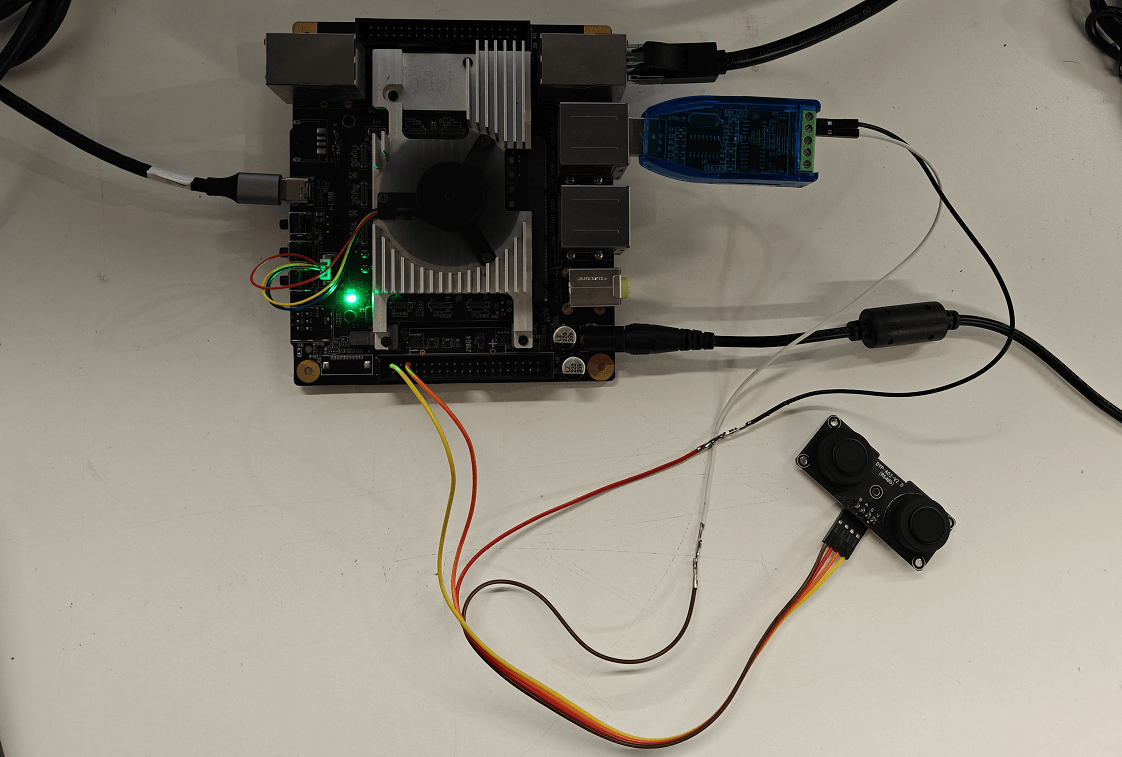
- Identify the USB-to-RS485 adapter board device:
shell
ls -l /dev/ttyU*
Testing
The DYP ultrasonic sensor requires a manual distance measurement command to be sent to return a ranging result—one command sent yields one result.
- Since the minicom testing tool cannot send hexadecimal data to control the sensor for ranging, a script can be written to convert the data format and send it to the serial port device. The script content is as follows:
shell
#!/bin/bash
# Check the number of parameters
if [ "$#" -ne 2 ]; then
    echo "Usage: $0 [Serial Port Device] [Hexadecimal Data]"
    exit 1
fi
# Serial port device, e.g., /dev/ttyS2
SERIAL_PORT=$1

# Hexadecimal data, e.g., '1F2E3D4C'
HEX_DATA=$2

# Convert hexadecimal data to binary stream and send to the serial port
printf "$HEX_DATA" | xxd -r -p > $SERIAL_PORT- Send the control command using the script:
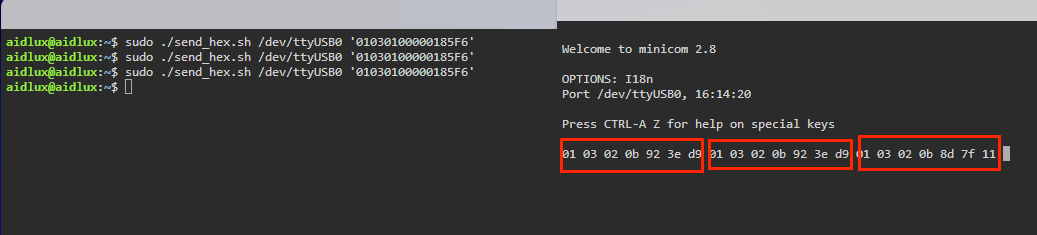
sudo ./send_hex.sh /dev/ttyUSB0 '01030100000185F6'
shell
./send_hex.sh /dev/ttyUSB0 '01030100000185F6'/dev/ttyUSB0: Device number of the USB-to-RS485 adapter board01030100000185F6: Command to read processed value data. For other commands, refer to the DYP product manual.
- Receive data using the minicom tool in AidLux (install it first if not present:
sudo apt update; apt install minicom).
Open minicom: sudo minicom -D /dev/ttyHS1 -b 9600 -H
shell
sudo minicom -D /dev/ttyUSB0 -b 9600 -H/dev/ttyUSB0: Device number of the USB-to-RS485 adapter board-b 9600: Set the baud rate to 9600 (default baud rate of the sensor)-H: Display data in hexadecimal format