AidVoice SDK
Introduction
AidVoice SDK is an AI inference SDK specifically designed for voice-related models launched by Aplux. It aims to simplify the development of core voice processing functions based on edge AI technology, allowing for flexible and rapid integration into intelligent applications. The SDK provides a unified and efficient API, supporting industry-leading voice processing AI models to meet the requirements of various business scenarios.
Support Status
Operating System Support
| Linux | Android | |
|---|---|---|
| C++ | ✅ | / |
| Python | 🚧 | / |
| Java | / | ✅ |
Android SDK is a premium enterprise service. Contact Sales
ASR Model Support
| Whisper-Base-en | SenseVoiceSmall | Whisper-tiny | Whisper-base | Whisper-small | Whisper-medium |
|---|---|---|---|---|---|
| ✅ | ✅ | ✅ | ✅ | ✅ | ✅ |
TTS Model Support
| MeloTTS-Chinese | MeloTTS-English |
|---|---|
| ✅ | ✅ |
✅: Supported 🚧: Planned
SDK for Linux
Quick Start
Installation
# Install AidLite QNN version 2.36
sudo aid-pkg update
sudo aid-pkg install aidlite-sdk
sudo aid-pkg install aidlite-qnn236

# Install AidVoice SDK
sudo aid-pkg -i aidvoice-sdk
Model Acquisition
Obtain the corresponding model using the mms tool, taking SenseVoiceSmall as an example:
mms list sensevoicesmall

#------------------------ SenseVoiceSmall models available ------------------------
Model             Precision  Chipset           Backend
-----             ---------  -------           -------
SenseVoiceSmall   W8A16      Qualcomm QCS8550  QNN2.31
SenseVoiceSmall   FP16       Qualcomm QCS8550  QNN2.31
SenseVoiceSmall   W8A16      Qualcomm QCS6490  QNN2.31

# Download SenseVoiceSmall
mms get -m SenseVoiceSmall -p fp16 -c qcs8550 -b qnn2.31 -d /home/aidlux/sensevoicesmall
Development Workflow
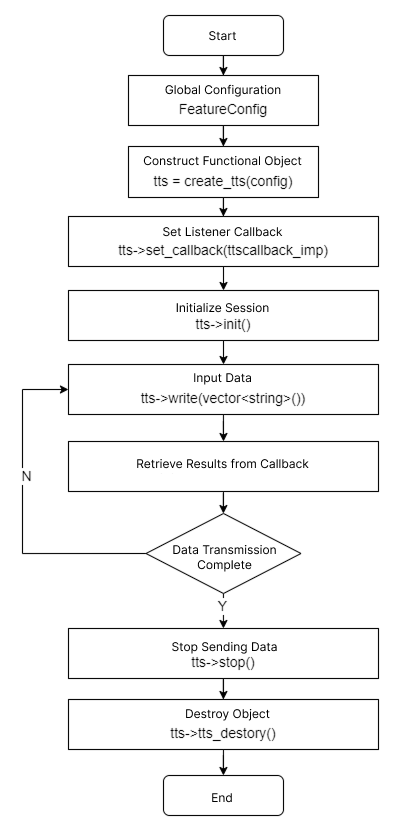
ASR
TTS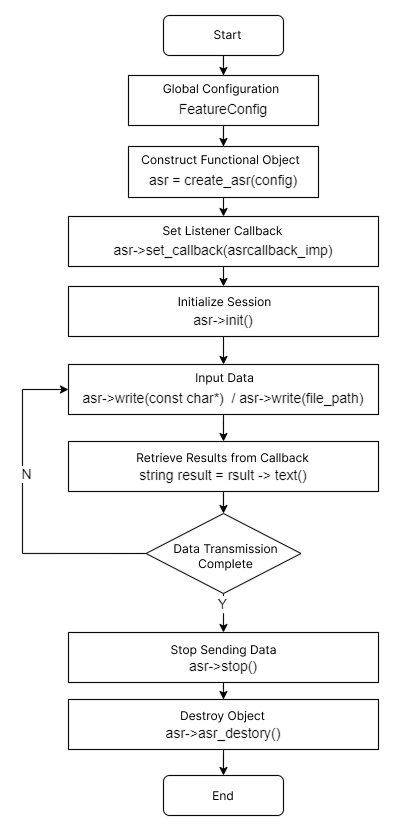
ASR Examples
For more cases, please refer to the <a href="/software/tutorial" target="_blank">Case Center</a>.
ASR: Recognizing Audio Files on QCS8550 Linux System
Install AidVoice SDK
# Install AidLite QNN version 2.36
sudo aid-pkg update
sudo aid-pkg install aidlite-sdk
sudo aid-pkg install aidlite-qnn236

# Install AidVoice SDK
sudo aid-pkg -i aidvoice-sdk
Model Acquisition
# Obtain Whisper-small

mms get -m Whisper-small -p fp16 -c qcs8550 -b qnn2.31 -d /home/aidlux/whisper-small

cd /home/aidlux/whisper-small
unzip Whisper-small_qcs8550_fp16.zip
Test Code Compilation
# Copy test code
cp -r /usr/local/share/aidvoice/examples /home/aidlux/aidvoice

# Compile
cd /home/aidlux/aidvoice/asr/cpp/
mkdir -p build && cd build
cmake ..
make
Run Example
# -m model path
# -a audio path (optional, uses default if not provided)
./test_asr -m /home/aidlux/whisper-small/models/QCS8550/FP16
TTS Example
TTS: Text-to-Speech on QCS8550 Linux System
Install AidVoice SDK
# Install AidLite QNN version 2.36
sudo aid-pkg update
sudo aid-pkg install aidlite-sdk
sudo aid-pkg install aidlite-qnn236

# Install AidVoice SDK
sudo aid-pkg -i aidvoice-sdk
Model Acquisition
# Obtain MeloTTS-English

mms get -m MeloTTS-English -p fp16 -c qcs8550 -b qnn2.31 -d /home/aidlux/melotts-english

cd /home/aidlux/melotts-english
unzip MeloTTS-English_qcs8550_fp16.zip
Test Code Compilation
# Copy test code
cp -r /usr/local/share/aidvoice/examples /home/aidlux/aidvoice

# Compile
cd /home/aidlux/aidvoice/tts/cpp/
mkdir -p build && cd build
cmake ..
make
Run Example
cd /home/aidlux/aidvoice/tts/cpp/build
./test_tts -m /home/aidlux/melotts-english/models/QCS8550/FP16
The audio file will be generated in the current directory.