Edge Deployment of HY-MT1.5-1.8B
Introduction
HY-MT1.5-1.8B is the 1.5 version of the Hunyuan translation model released by Tencent. As an upgraded version of the WMT25 championship model, it is optimized for explanatory translation and mixed-language scenarios, and adds support for terminology intervention, contextual translation, and formatted translation. Although HY-MT1.5-1.8B has less than one-third the parameter count of HY-MT1.5-7B, its translation performance is comparable to that of the larger model, balancing high speed with high quality. After quantization, the 1.8B model can be deployed on edge devices and supports real-time translation scenarios, offering broad application prospects.
This chapter demonstrates how to perform HY-MT1.5-1.8B deployment, loading, and translation on edge devices. Two deployment methods are provided:
- AidGen C++ API
- AidGenSE OpenAI API
In this case, the large language model inference runs on the device side, and the relevant interfaces are called through code to receive user input and return conversation results in real time.
- Device: Rhino Pi-X1
- System: Ubuntu 22.04
- Model: HY-MT1.5-1.8B
Supported Platforms
| Platform | Running Method |
|---|---|
| Rhino Pi-X1 | Ubuntu 22.04, AidLux |
Preparation
- Rhino Pi-X1 hardware
- Ubuntu 22.04 system or AidLux system
AidGen Case Deployment
Step 1: Install the AidGen SDK
# Install AidGen SDK
sudo aid-pkg update
sudo aid-pkg -i aidgen-sdk
sudo aid-pkg -i aidgen-qnn236
sudo aid-pkg -i aidgen-qnn240

# Copy test code
cd /home/aidlux/aidllm

cp -r /usr/local/share/aidgen/examples/ ./
Step 2: Download Model Resources
Since HY-MT1.5-1.8B is currently in the Model Farm preview section, it must be retrieved via the
mmscommand.
# Log in
mms login

# Search for the model
mms list HY

# Download the model
mms get -m HY-MT1.5-1.8B -p w4a16 -c qcs8550 -b qnn2.36 -d /home/aidlux/aidllm/hy-mt

cd /home/aidlux/aidllm/hy-mt
unzip qnn236_qcs8550_cl2048.zip
mv qnn236_qcs8550_cl2048/* /home/aidlux/aidllm
Step 3: Create the Configuration File
cd /home/aidlux/aidllm
vim hy-mt-aidgen-config.json
Create the following json configuration file:
{
    "backend_type": "genie",
    "prefix_path": "kv-cache.primary.qnn-htp",
    "model": {
        "path": [
            "hy-mt1.5-1.8b_qnn236_qcs8550_cl2048_1_of_2.serialized.bin.aidem",
            "hy-mt1.5-1.8b_qnn236_qcs8550_cl2048_2_of_2.serialized.bin.aidem"
        ]
    }
}
Step 4: Confirm Resource Files
The file distribution is as follows:
/home/aidlux/aidllm
├── aidgen_chat_template.txt
├── chat.txt
├── htp_backend_ext_config.json
├── hy-mt1.5-1.8b-htp.json
├── hy-mt-aidgen-config.json
├── kv-cache.primary.qnn-htp
├── hy-mt1.5-1.8b-tokenizer.json
├── hy-mt1.5-1.8b_qnn236_qcs8550_cl2048_1_of_2.serialized.bin.aidem
├── hy-mt1.5-1.8b_qnn236_qcs8550_cl2048_2_of_2.serialized.bin.aidem
├── examples
Step 5: Set the Conversation Template
💡Note
For the conversation template, refer to the aidgen_chat_template.txt file in the model resource package.
Modify the test_aidgen_text.cpp file according to the large model's template:
std::string system_prompt =
    "<|hy_begin▁of▁sentence|><|hy_place▁holder▁no▁3|>\n"
    "<|hy_begin▁of▁sentence|>\n"
    "<|hy_User|>Translate the following segment into Chinese, without additional explanation.\n\n";
// User turn: wraps the user input and triggers assistant generation
auto make_user_turn = [](const std::string& text) -> std::string {
return text + "\n<|hy_Assistant|>";
};
Step 6: Compile and Run
# Install dependencies
cd /home/aidlux/aidllm/examples

# Compile
mkdir build && cd build
cmake .. && make

mv test_text_only /home/aidlux/aidllm/

cd /home/aidlux/aidllm/
./test_text_only hy-mt-aidgen-config.json "Success is not final, failure is not fatal: it is the courage to continue that counts. Believe in yourself and all that you are, for greatness lives within your soul."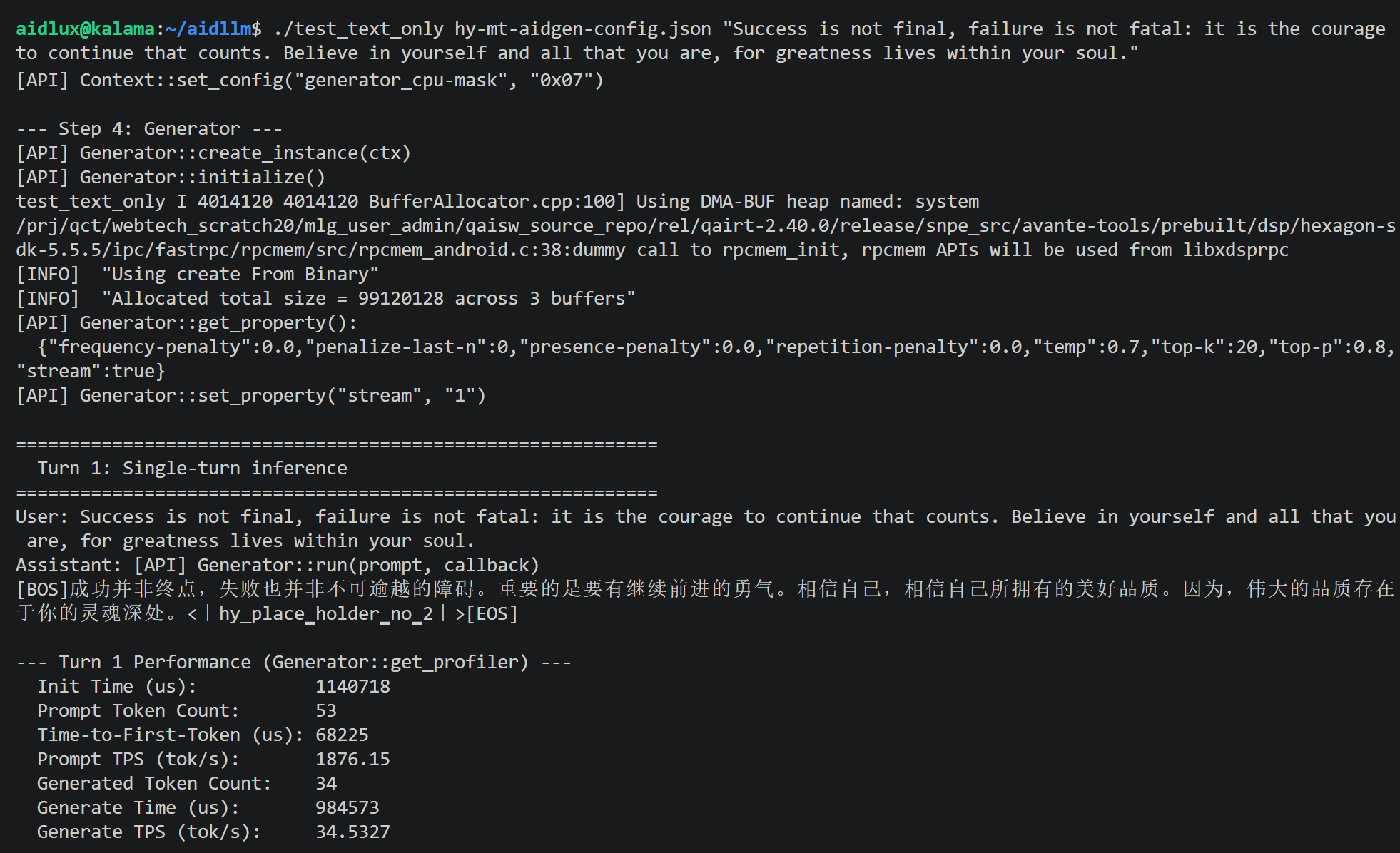
AidGenSE Case Deployment
Step 1: Install AidGenSE
sudo aid-pkg update

# Ensure aidgense is the latest version
sudo aid-pkg remove aidgense
sudo aid-pkg -i aidgense
sudo aid-pkg -i aidgen-sdk
sudo aid-pkg -i aidgen-qnn236
sudo aid-pkg -i aidgen-qnn240
Step 2: Model Query & Retrieval
# View models
aidllm remote-list api | grep hy

#------------------------ You can see the HY-MT1.5-1.8B model ------------------------

Current Soc : 8550

Name                                                    Url                                                           CreateTime
-----                                                   ---------                                                     ---------
hy-mt1.5-1.8b-qnn2.36-w4a16-qcs8550                     aplux/hy-mt1.5-1.8b-qnn2.36-w4a16-qcs8550                     2026-05-15 10:58:38
...


# Download HY-MT1.5-1.8B

aidllm pull api aplux/hy-mt1.5-1.8b-qnn2.36-w4a16-qcs8550
Step 3: Start the HTTP Service
# Start the OpenAI API service for the corresponding model
aidllm start api -m hy-mt1.5-1.8b-qnn2.36-w4a16-qcs8550

# Check status
aidllm status api

# Stop service: aidllm stop api

# Restart service: aidllm restart api
💡Note
The default port is 8888.
Step 4: Chat Test
Chat Test via Web UI
# Install UI frontend service
sudo aidllm install ui

# Start UI service
aidllm start ui

# Check UI service status: aidllm status ui

# Stop UI service: aidllm stop ui
After the UI service starts, visit http://ip:51104.
Enter the following conversation template to perform translation:
Translate the following segment into Chinese, without additional explanation.

Success is not final, failure is not fatal: it is the courage to continue that counts. Believe in yourself and all that you are, for greatness lives within your soul.
Chat Test via Python
import os
import requests
import json

def stream_chat_completion(messages, model="hy-mt1.5-1.8b-qnn2.36-w4a16-qcs8550"):

    url = "http://127.0.0.1:8888/v1/chat/completions"
    headers = {
        "Content-Type": "application/json"
    }
    payload = {
        "model": model,
        "messages": messages,
        "stream": True    # Enable streaming
    }

    # Make request with stream=True
    response = requests.post(url, headers=headers, json=payload, stream=True)
    response.raise_for_status()

    # Read line by line and parse SSE format
    for line in response.iter_lines():
        if not line:
            continue
        # print(line)
        line_data = line.decode('utf-8')
        # Each SSE line starts with the "data: " prefix
        if line_data.startswith("data: "):
            data = line_data[len("data: "):]
            # End marker
            if data.strip() == "[DONE]":
                break
            try:
                chunk = json.loads(data)
            except json.JSONDecodeError:
                # Print and skip when parsing fails
                print("Unable to parse JSON:", data)
                continue

            # Extract the model output token
            content = chunk["choices"][0]["delta"].get("content")
            if content:
                print(content, end="", flush=True)

if __name__ == "__main__":
    # Example conversation
    messages = [
        {"role": "system", "content": ""},
        {"role": "user", "content": "Translate the following segment into Chinese, without additional explanation.\n\nSuccess is not final, failure is not fatal: it is the courage to continue that counts. Believe in yourself and all that you are, for greatness lives within your soul."}
    ]
    print("Assistant:", end=" ")
    stream_chat_completion(messages)
    print()  # New line