Quick Start with MMS (Recommended)
This section describes how to use the Model Farm web portal in conjunction with MMS command-line tools to quickly evaluate models and run examples.
Hardware Preparation
The models provided by Model Farm are optimized for Qualcomm Dragonwing™ IoT chip platforms and have undergone performance testing on development boards featuring Qualcomm silicon. Model Farm currently supports the following Qualcomm chip models:
- Qualcomm QCS6490
- Qualcomm QCS8550
- Qualcomm QCS8625
- Qualcomm Dragonwing™ IQ9
- Qualcomm Dragonwing™ IQ8
Prepare a Developer Account
Developers can browse model information and performance metrics on Model Farm without logging in.
However, a developer account is required to download models and sample code.
- Register as an Aplux Developer:
- Please visit: Developer Account Registration
- Follow the registration form prompts and requirements to fill in your developer information.
- After ensuring the information is correct, submit your account creation request.
Search for Models
Developers can search for models on Model Farm based on their requirements to view detailed specifications and perform quick evaluations.
Access the Model Farm website via a browser to browse and view model details.
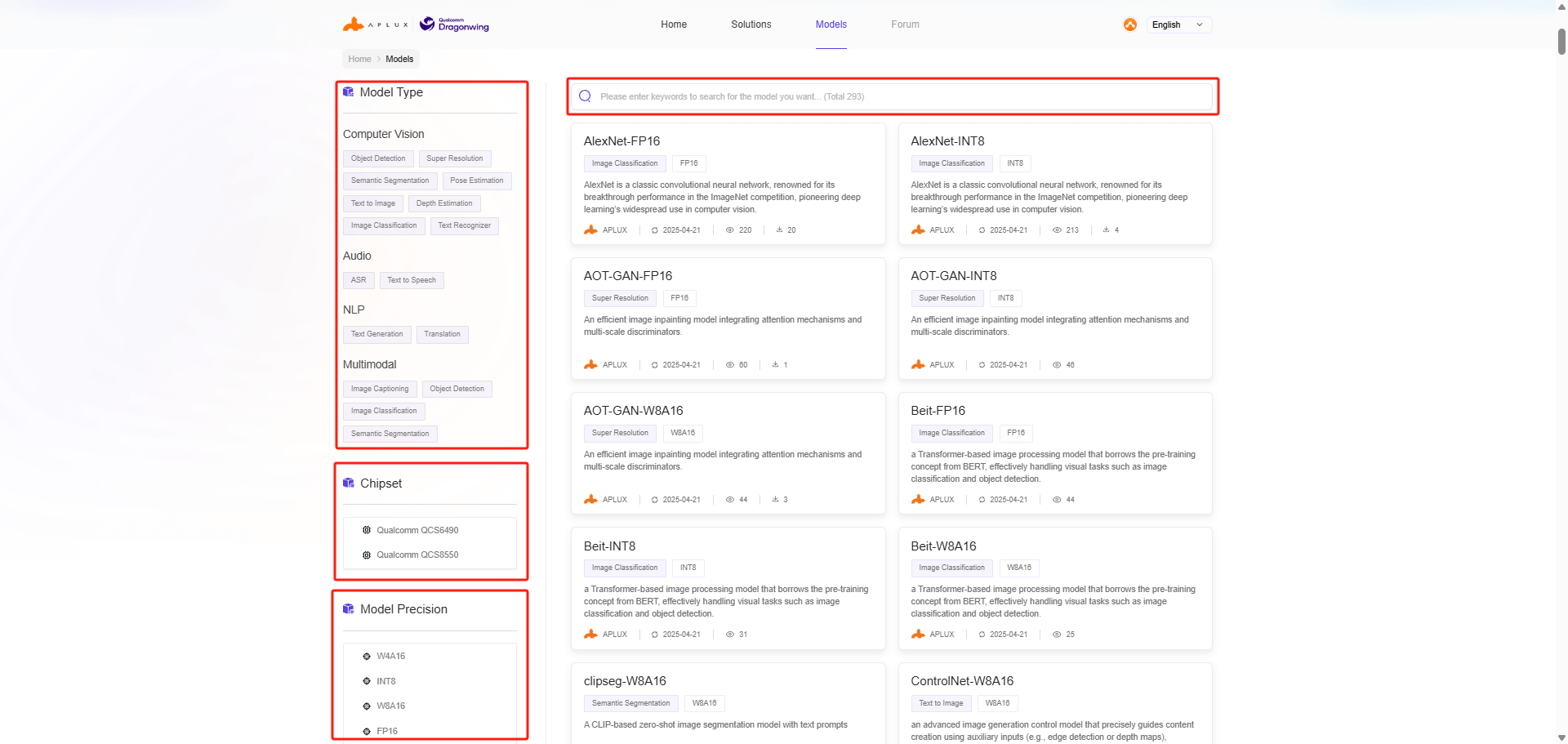
Model Farm provides multiple ways to filter and find models:
- Filter by model type
- Filter by model data precision
- Filter by chip platform
- Keyword search
View Model Details
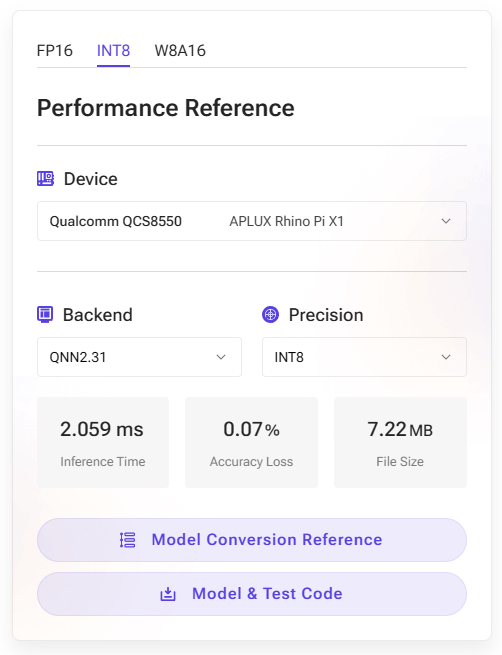
The model details page on Model Farm provides actual measured performance of AI models with different quantization precisions on corresponding hardware.
- Device: The development board and corresponding chip model used for the actual performance measurement.
- AI Framework: The framework and version number used for model conversion and inference.
- Data Precision: The data precision used by the converted model.
- Inference Latency: The actual measured time for model execution, excluding pre- and post-processing.
- Accuracy Loss: The cosine similarity of the output matrix between the source model (FP32) and the converted model.
- Model Size: The file size of the converted model.
💡Note
For the same SoC, model performance may vary across different hardware specifications; these figures should be used as a reference.
Example of YOLOv5s on Rhino Pi-X1 (Qualcomm QCS8550):
Download Models
MMS is a component provided for Aplux development board users. It allows users to log in to Model Farm and query or download model files via the command line.
MMS Login
# Log in to Model Farm
mms login

# Enter your username:
# Enter your password:

# After entering the correct account and password:
# Login successfully.
MMS Model Query
# List all models
mms list

# Search for models by name
mms list yolo
Model         Precision  Chipset           Backend
-----         ---------  -------           -------
YOLO-NAS-l    FP16       Qualcomm QCS8550  QNN2.29
YOLO-NAS-l    INT8       Qualcomm QCS6490  QNN2.29
YOLO-NAS-l    INT8       Qualcomm QCS8550  QNN2.29
YOLO-NAS-l    W8A16      Qualcomm QCS6490  QNN2.29
YOLO-NAS-l    W8A16      Qualcomm QCS8550  QNN2.29
YOLO-NAS-m    FP16       Qualcomm QCS8550  QNN2.29
YOLO-NAS-m    INT8       Qualcomm QCS6490  QNN2.29
YOLO-NAS-m    INT8       Qualcomm QCS8550  QNN2.29
MMS Model Download
# -m: Model name
# -p: Model precision
# -c: Chipset
# -b: QNN version
# -d: Specified download path
# Download the yolov6l model with INT8 precision, optimized for the QCS8550 platform using QNN2.23

mms get -m yolov6l -p int8 -c qcs8550 -b qnn2.23 -d /home/aidlux/yolov6l


# Downloading model from https://aiot.aidlux.com to directory: /var/opt/modelfarm_models
#
# Downloading [yolov6l_qcs8550_qnn2.23_int8_aidlite.zip] ... done! [40.45MB in 375ms; 81.51MB/s]
#
# Download complete!
💡Note
For models in the Preview section (where the button displays Contact Us), direct web downloads are not available. These must be downloaded using the MMS tool on an Aplux development board. For details, please refer to: Quick Start (MMS).
Model Testing
Models downloaded via MMS can be tested for inference using the following two methods:
Using APLUX AidLite for Inference
Aplux provides the AidLite AI Inference Framework, which is used to invoke the Qualcomm NPU on edge devices for AI model inference.
All models supported by Model Farm can perform inference via the AidLite SDK. Additionally, Model Farm provides pre- and post-processing code for these models to ensure developers can quickly verify model results.
By following the Download Models steps, developers will obtain a complete package containing the model file and inference code. The file structure is as follows:
    /{model_name}_{SoC Name}_{Precision}

    |__ models # folder where model files are stored

    |__ code # aidlite python model inference example

        |__ python # aidlite python model inference example

        |__ cpp # aidlite cpp model inference example

        |__ README.md
For a specific example, please refer to: YOLOv5 Deployment.
💡Note
For models in the Preview section (where the button displays Contact Us), inference can only be performed using the AidLite SDK on an Aplux development board.
Using Qualcomm QNN for Inference
Please refer to the Qualcomm QNN Documentation.
Advanced Usage: Converting and Testing Fine-tuned Models
Aplux provides the AIMO Model Optimization Platform to convert models into formats exclusive to the Qualcomm platform.
Most models supported by Model Farm can be converted using AIMO. Consequently, Model Farm provides not only the optimized model files but also the reference conversion steps for using AIMO.
AIMO model conversion reference steps can be found in two places:
- On the Performance Reference module on the right side of the model details page; click Model Conversion Reference to access it.
- In the Model Conversion Reference section of the
README.mdfile within the code package.
For an introduction and usage guide for AIMO, please refer to: AIMO Model Optimization Platform User Guide.
Developers can simply replace the model in the Model Farm example with the .amf model file output by AIMO.