Deploying VLM with AidGen
Introduction
Deploying a vision language model (VLM) on edge devices refers to compressing, quantizing, and deploying large models that originally run in the cloud onto local devices, enabling offline, low-latency natural language understanding and generation. This chapter is based on the AidGen inference engine and demonstrates how to perform deployment, loading, and conversation of multimodal large models on edge devices.
In this case, the multimodal large model inference runs on the device side, and the relevant interfaces are called through C++ code to receive user input and return conversation results in real time.
- Device: Rhino Pi-X1
- System: Ubuntu 22.04
- Model: Qwen2.5-VL-3B (392x392)
Supported Platforms
| Platform | Running Method |
|---|---|
| Rhino Pi-X1 | Ubuntu 22.04, AidLux |
Preparation
- Rhino Pi-X1 hardware
- Ubuntu 22.04 system or AidLux system
Case Deployment
Step 1: Install the AidGen SDK
# Install AidGen SDK
sudo aid-pkg update
sudo aid-pkg -i aidgen-sdk
sudo aid-pkg -i aidgen-qnn236
sudo aid-pkg -i aidgen-qnn240

# Copy test code
mkdir /home/aidlux/aidmlm
cd /home/aidlux/aidmlm
cp -r /usr/local/share/aidgen/examples/ ./
Step 2: Model Acquisition
Since Qwen2.5-VL-3B (392x392) is currently in the Model Farm preview section, it must be retrieved via the
mmscommand.
# Log in
mms login

# Search for the model
mms list Qwen2.5-VL-3B

# Download the model
mms get -m 'Qwen2.5-VL-3B-Instruct (392x392)' -p w4a16 -c qcs8550 -b qnn2.36 -d /home/aidlux/aidmlm/qwen2.5-vl-3b-392

cd /home/aidlux/aidmlm/qwen2.5-vl-3b-392
unzip qnn236_qcs8550_cl2048.zip
mv qnn236_qcs8550_cl2048/* /home/aidlux/aidmlm/
Step 3: Create the Configuration File
cd /home/aidlux/aidmlm
vim config3b_392.json
Create the following json configuration file:
{
    "backend_type": "genie",
    "model": {},
    "vlm_model":{
        "vision_model_path":"veg.serialized.bin.aidem",
        "pos_embed_cos_path":"position_ids_cos.raw",
        "pos_embed_sin_path":"position_ids_sin.raw",
        "vocab_embed_path":"embedding_weights_151936x2048.raw",
        "window_attention_mask_path":"window_attention_mask.raw",
        "full_attention_mask_path":"full_attention_mask.raw",
        "llm_path_list":[
            "qwen2p5-vl-3b_qnn236_qcs8550_cl2048_1_of_1.serialized.bin.aidem"
        ]
    }
}
The file distribution is as follows:
/home/aidlux/aidmlm
├── embedding_weights_151936x2048.raw
├── full_attention_mask.raw
├── position_ids_cos.raw
├── position_ids_sin.raw
├── qwen2p5-vl-3b_qnn236_qcs8550_cl2048_1_of_1.serialized.bin.aidem
├── veg.serialized.bin.aidem
├── window_attention_mask.raw
├── examples
Step 4: Compile and Run
cd /home/aidlux/aidmlm/examples

mkdir build && cd build
cmake .. && make

mv test_multimodal /home/aidlux/aidmlm/
cd /home/aidlux/aidmlm/

# Manually upload an image to the /home/aidlux/aidmlm/ directory
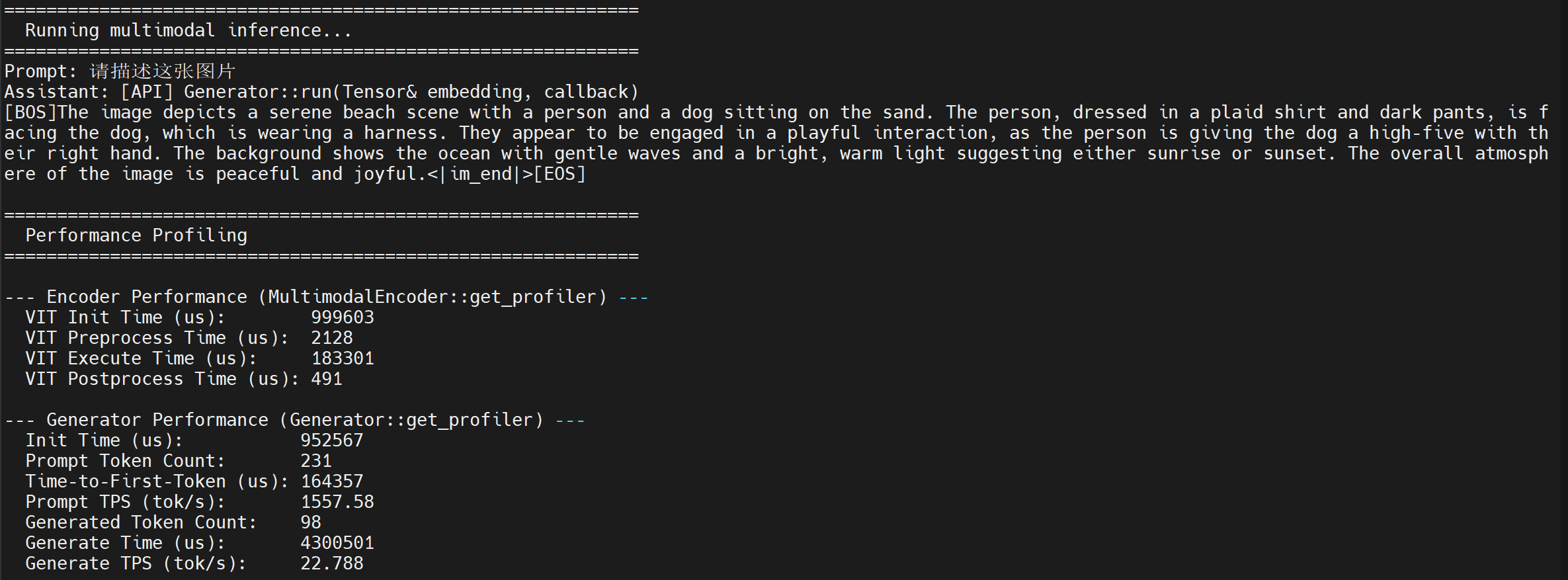
./test_multimodal config3b_392.json test-1.jpg "Please describe this image"- The running result is shown below: