AidGen SDK Development Documentation
Introduction
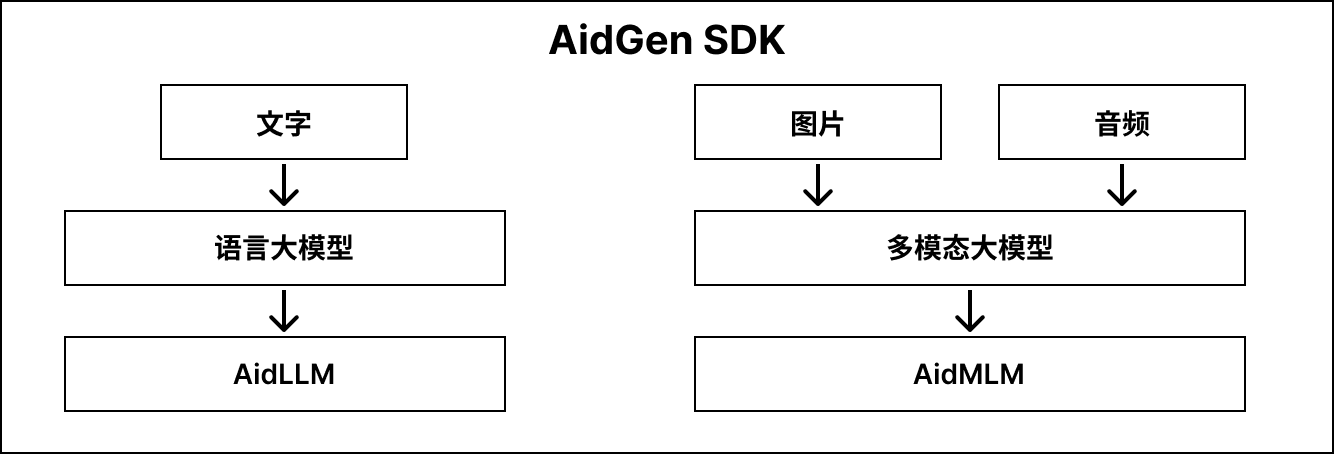
AidGen is an inference framework specifically designed for generative Transformer models, built on top of AidLite. It aims to fully utilize various computing units of the hardware (CPU, GPU, NPU) to achieve inference acceleration for large models on edge devices.
AidGen is an SDK-level development kit that provides atomic-level large model inference interfaces, suitable for developers who want to integrate large model inference into their own applications.
AidGen supports multiple types of generative AI models:
- Language large models -> AidLLM inference
- Multimodal large models -> AidMLM inference
The structure is shown in the diagram below:
💡Note
All large models supported by Model Farm achieve inference acceleration on Qualcomm chip NPUs through AidGen.
Support Status
Model Type Support
| AidLLM | AidMLM | |
|---|---|---|
| Text | ✅ | / |
| Image | / | ✅ |
| Audio | / | 🚧 |
✅: Supported 🚧: Planned support
Operating System Support
| Linux | AidLux | Android | |
|---|---|---|---|
| C++ | ✅ | ✅ | / |
| Python | 🚧 | 🚧 | / |
| Java | / | / | 🚧 |
✅: Supported 🚧: Planned support
Large Language Model AidLLM SDK
Installation
sudo aid-pkg update
sudo aid-pkg -i aidgen-sdk
sudo aid-pkg -i aidgen-qnn236
sudo aid-pkg -i aidgen-qnn240

# Copy test code
cd /home/aidlux/aidllm

cp -r /usr/local/share/aidgen/examples/ ./
Model File Acquisition
- Model files and default configuration files can be downloaded directly from the Model Farm Large Model Section.
- Retrieve and download the model via the command line, using Qwen2.5-0.5B-Instruct as an example:
# Log in
mms login

# Search for the model
mms list Qwen2.5-0.5B-Instruct

# Download the model
mms get -m Qwen2.5-0.5B-Instruct -p w4a16 -c qcs8550 -b qnn2.29 -d /home/aidlux/aidllm/qwen2.5-0.5b-instruct

cd /home/aidlux/aidllm/qwen2.5-0.5b-instruct
unzip qnn229_qcs8550_cl4096.zip
mv qnn229_qcs8550_cl4096/* /home/aidlux/aidllm/
Model Performance Monitoring
💡Note
Please ensure that the sample application can run to completion successfully.
Taking the example Deploying Qwen2.5-0.5B-Instruct on Qualcomm QCS8550:
cd /home/aidlux/aidllm/examples

# Compile
mkdir build && cd build
cmake .. && make

mv test_text_only /home/aidlux/aidllm/

cd /home/aidlux/aidllm/
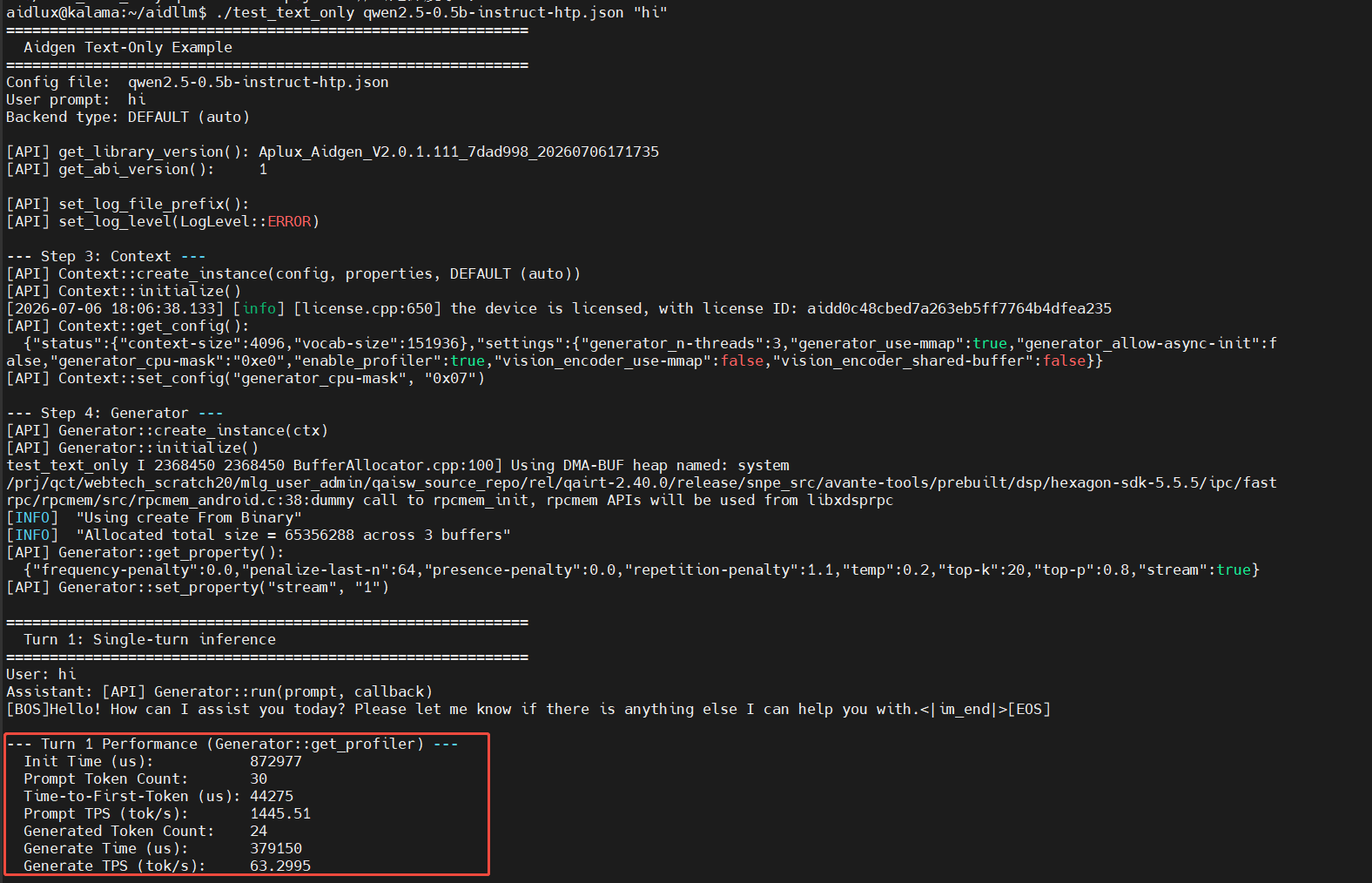
./test_text_only qwen2.5-0.5b-instruct-htp.json "hi"- After entering the conversation content in the terminal, you will see the following log information:
Example Applications
- Deploying Qwen2.5-0.5B-Instruct on Qualcomm QCS8550
- Deploying the Qwen3 Series on Qualcomm QCS8550
- Deploying HY-MT1.5-1.8B on Qualcomm QCS8550
Multi-modal Vision Model AidMLM SDK
Model Support
| Model | Status |
|---|---|
| Qwen2.5-VL-3B-Instruct | ✅ |
| Qwen2.5-VL-7B-Instruct | ✅ |
| InternVL3-2B | 🚧 |
| Qwen3-VL-4b | 🚧 |
| Qwen3-VL-2b | 🚧 |
Installation
sudo aid-pkg update
sudo aid-pkg -i aidgen-sdk
sudo aid-pkg -i aidgen-qnn236
sudo aid-pkg -i aidgen-qnn240

# Copy test code
mkdir /home/aidlux/aidmlm
cd /home/aidlux/aidmlm
cp -r /usr/local/share/aidgen/examples/ ./
Model File Acquisition
Since Qwen2.5-VL-3B (392x392) is currently in the Model Farm preview section, it must be retrieved via the
mmscommand.
# Log in
mms login

# Search for the model
mms list Qwen2.5-VL-3B

# Download the model
mms get -m 'Qwen2.5-VL-3B-Instruct (392x392)' -p w4a16 -c qcs8550 -b qnn2.36 -d /home/aidlux/aidmlm/qwen2.5-vl-3b-392

cd /home/aidlux/aidmlm/qwen2.5-vl-3b-392
unzip qnn236_qcs8550_cl2048.zip
mv qnn236_qcs8550_cl2048/* /home/aidlux/aidmlm/
Create Configuration File
cd /home/aidlux/aidmlm
vim config3b_392.json
Create the following json configuration file:
{
    "backend_type": "genie",
    "model": {},
    "vlm_model":{
        "vision_model_path":"veg.serialized.bin.aidem",
        "pos_embed_cos_path":"position_ids_cos.raw",
        "pos_embed_sin_path":"position_ids_sin.raw",
        "vocab_embed_path":"embedding_weights_151936x2048.raw",
        "window_attention_mask_path":"window_attention_mask.raw",
        "full_attention_mask_path":"full_attention_mask.raw",
        "llm_path_list":[
            "qwen2p5-vl-3b_qnn236_qcs8550_cl2048_1_of_1.serialized.bin.aidem"
        ]
    }
}
The file distribution is as follows:
/home/aidlux/aidmlm
├── embedding_weights_151936x2048.raw
├── full_attention_mask.raw
├── position_ids_cos.raw
├── position_ids_sin.raw
├── qwen2p5-vl-3b_qnn236_qcs8550_cl2048_1_of_1.serialized.bin.aidem
├── veg.serialized.bin.aidem
├── window_attention_mask.raw
├── examples
Model Performance Monitoring
💡Note
Please ensure that the sample application can run to completion successfully.
Taking the example Deploying Qwen2.5-VL-3B-Instruct (392x392) on Qualcomm QCS8550:
cd /home/aidlux/aidmlm/examples

mkdir build && cd build
cmake .. && make

mv test_multimodal /home/aidlux/aidmlm/
cd /home/aidlux/aidmlm/

# Manually upload an image to the /home/aidlux/aidmlm/ directory
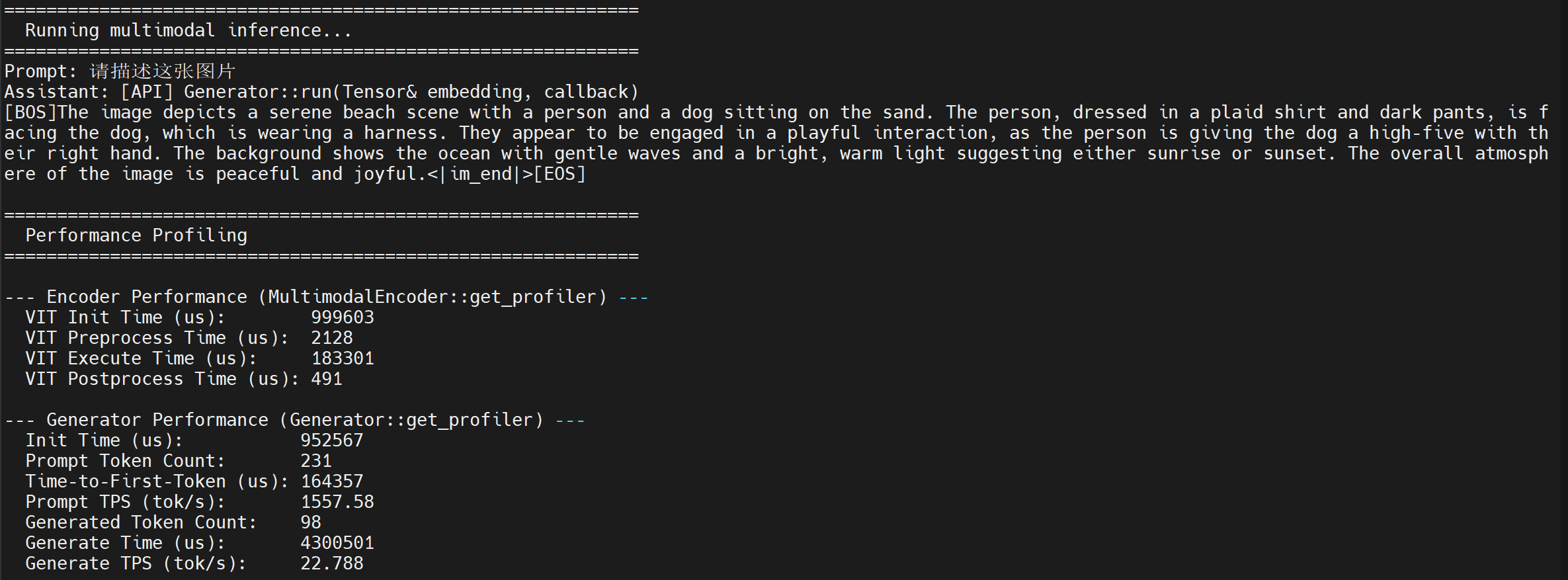
./test_multimodal config3b_392.json test-1.jpg "Please describe this image"- After entering the conversation content in the terminal, you will see the following log information:
Example Applications
Modifying Inference Parameters
AidGen supports dynamic modification of parameters related to model inference. Currently supported parameters include:
- temp
- top-k
- top-p
- stream
Refer to the following code in the test_aidgen_text.cpp file to modify parameters:
    // Set generator property
    std::cout << "[API] Generator::set_property(\"stream\", \"1\")" << std::endl;
    generator->set_property("stream", "1");