Typical Scenario Demos
The A8550MA1 can perform on-device voice capture, speech recognition, semantic understanding, knowledge retrieval, translation, speech synthesis, and business control. AidVoice, the intelligent voice platform, combines these capabilities into pipelines, making it easy for developers to validate the full chain and further integrate it with their own devices and business systems.
AidVoice Intelligent Voice Demo
Demo Capability Overview
| Scenario | Input | Processing Pipeline | Output |
|---|---|---|---|
| Command Control | Natural voice commands such as "go forward", "turn", "lights" | Voice capture → ASR → Intent recognition / Command formatting → Control interface | Structured commands, device execution results, voice feedback |
| Real-time Translation | Continuous Chinese speech or short sentences | Voice capture → Streaming ASR → Translation model → Subtitles / TTS | English translation stream, subtitles, optional voice playback |
| RAG Knowledge Q&A | Voice questions about local documents | ASR → Question rewriting → Top-K retrieval → LLM answer → TTS | Knowledge base-based answers, cited excerpts, optional voice playback |
| Meeting Transcription & Summarization | Continuous meeting speech | Streaming ASR → Text caching / Segmentation → LLM summarization | Real-time transcription, segment summaries, final minutes & action items |
Real-time Translation Demo
The real-time translation demo demonstrates the complete process of Chinese speech input, streaming recognition, English translation, subtitle display, and voice playback.
- Microphone captures Chinese speech.
- ASR outputs recognized text.
- The translation model generates English translations in streaming fashion.
- The application continuously refreshes subtitles.
- Optionally, TTS reads the translation aloud based on the scenario.
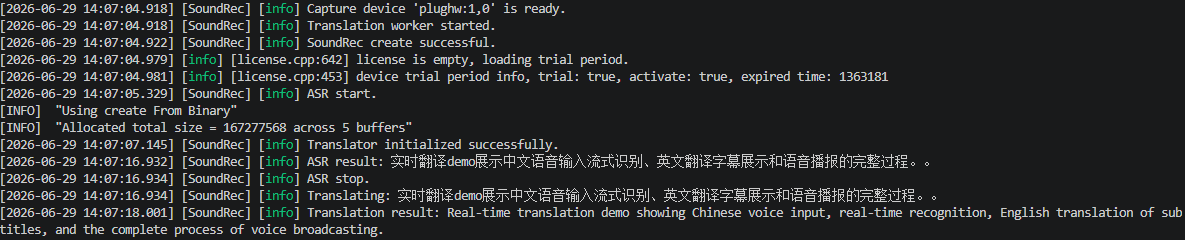
Demo Phase Metrics
| Phase | Reference Result |
|---|---|
| ASR output → First translation token | ~0.18 s |
| ASR output → Complete translation | ~1.14 s |
| Translation complete → TTS write | ~0.19 s |
Streaming translations and phase latencies in runtime logs
Other Demo Reference Metrics
| Demo | Key Phase | Reference Result (This Demo) |
|---|---|---|
| Command Control | ASR output → Command output | < 1.5 s |
| RAG Knowledge Q&A | Wake → ASR output | ~3.30 s |
| RAG Knowledge Q&A | ASR output → RAG retrieval complete | ~1.99 s |
| RAG Knowledge Q&A | ASR output → First answer character | ~5.27 s |
| Meeting Transcription & Summarization | Text cache trigger threshold | 110 characters |
| Meeting Transcription & Summarization | Trigger → Model first packet | ~0.21 s |
| Meeting Transcription & Summarization | Trigger → First summary character | ~0.68 s |
Test Notes
The above data comes from phase recordings under the current demo configuration and is intended to illustrate the pipeline and establish acceptance criteria. Actual results are influenced by model version, input length, audio environment, system load, knowledge base size, and output length. Please refer to the target version and actual test environment.
AidVoice Demo Downloads
Go to the Reference Design Materials page to download the demo source code.
Project Integration Approach
- Determine the scenario: Select a profile such as voice control, real-time translation, knowledge Q&A, or meeting summarization.
- Select components: Enable ASR, TTS, LLM, RAG, translation, and device control interfaces as needed.
- Configure business rules: Set trigger conditions, prompts, knowledge bases, output formats, and exception handling policies.
- Integrate with customer systems: Connect to device APIs, databases, ticketing systems, or industry business platforms.
- Test and accept: Verify accuracy, phase latency, end-to-end latency, resource usage, stability, and execution success rates.
Tip
The AidVoice Demo can serve as a starting point for functional validation. Developers can keep the standard pipeline while replacing models, prompts, knowledge bases, and business plugins to create intelligent voice applications tailored to specific products.