Model Farm User Guide
Overview
To accelerate AI model performance evaluation for developers on target edge hardware platforms, APLUX has built the Model Farm platform. Model Farm includes hundreds of mainstream open-source models with various functionalities, optimized and adapted for different hardware platforms, and provides benchmark performance metrics measured in real-world conditions as a reference. Developers can quickly complete evaluations based on their specific requirements without investing significant costs or enduring long wait times.
Furthermore, Model Farm provides ready-to-run model inference example code, significantly lowering the difficulty and workload for developers to test model performance and develop AI functionality on their existing hardware, shortening the overall workflow and accelerating solution deployment.
Feature Overview
Specifically, Model Farm helps developers accomplish the following:
- Query the AI performance of specified models on specified Qualcomm hardware
- Download adapted and optimized AI models (which can invoke NPU hardware compute units for accelerated inference)
- Download corresponding pre/post-processing and model inference example code
- View model adaptation and optimization steps, making it easier for developers to reference and optimize their own fine-tuned models
Model Farm Test Workflow

Fine-Tuned Model Test Workflow

Model Management Service (MMS)
APLUX provides the Model Management Service (MMS) component. Developers can access Model Farm without going through a web browser, directly obtaining model information and related file packages on edge devices through this service.
System Dependency Configuration
Configure the AidLux Package Source
# Download the correct public key
sudo wget -O- https://archive.aidlux.com/ubuntu24/public.key | gpg --dearmor | sudo tee /etc/apt/trusted.gpg.d/private-aidlux.gpg > /dev/null

# Edit the source list file
sudo vim /etc/apt/sources.list.d/private-aidlux.list

# Add the repository provided by AidLux to the source file
deb [arch=arm64 signed-by=/etc/apt/trusted.gpg.d/private-aidlux.gpg] https://archive.aidlux.com/ubuntu24 noble main

# Update the package cache
sudo apt update
After the update is complete, you can use the following command to retrieve the official AidLux SDK dependencies:
sudo apt list | grep aid | grep unknown# Install software
# Must be installed first (not included with the system)
sudo apt install python3 python3-pip libopencv-dev python3-opencv net-tools
# Must be installed before aidlite
sudo apt install aidlux-aistack-base aidrtcm
# Install aidlite and dependencies
sudo apt install aid-lms aidlms-sdk aidlite-sdk cmake
sudo apt-get install libfmt-dev nlohmann-json3-dev
sudo apt install aidlite-*
# DSP support
sudo apt-get install qcom-fastrpc1
sudo apt-get install qcom-fastrpc-dev
# Install aidgen-sdk
sudo apt install aidgen-qnn240-sdk
# Install mms service
sudo apt install aid-mms
# GPU support
sudo add-apt-repository ppa:ubuntu-qcom-iot/qcom-noble-ppa
sudo apt install qcom-adreno-cl1
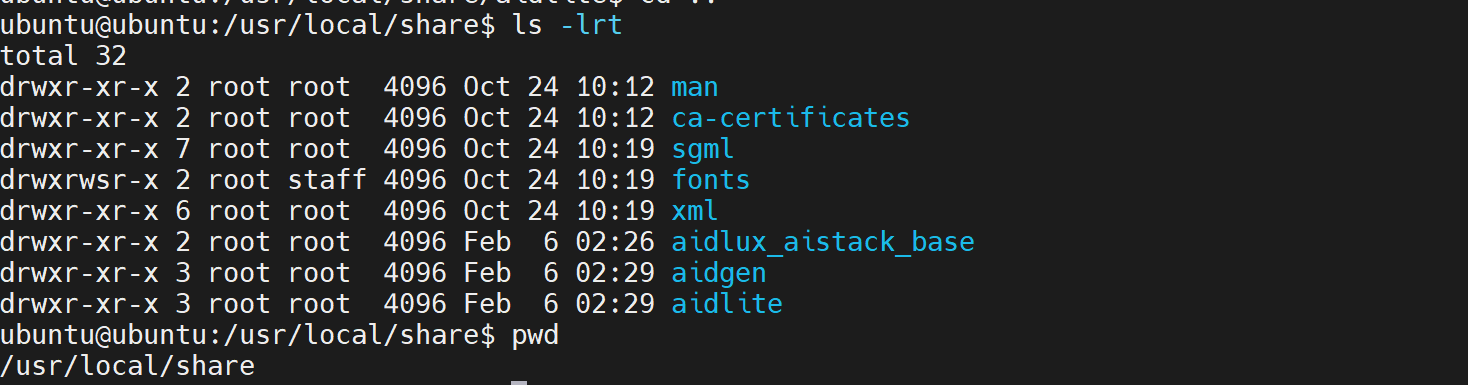
sudo ln -s /usr/lib/aarch64-linux-gnu/libOpenCL.so.1 /usr/lib/aarch64-linux-gnu/libOpenCL.soAfter installation, check that the aidlite and aidgen directories have been added under /usr/local/share:
Device Authorization
Obtain the Device Serial Number
cat /sys/devices/soc0/serial_numberObtain the License File
Provide the serial number to APLUX technical staff to generate a device-specific License file, then place it in the /etc/opt/aidlux/license/AidLuxLics directory.
Quick Start
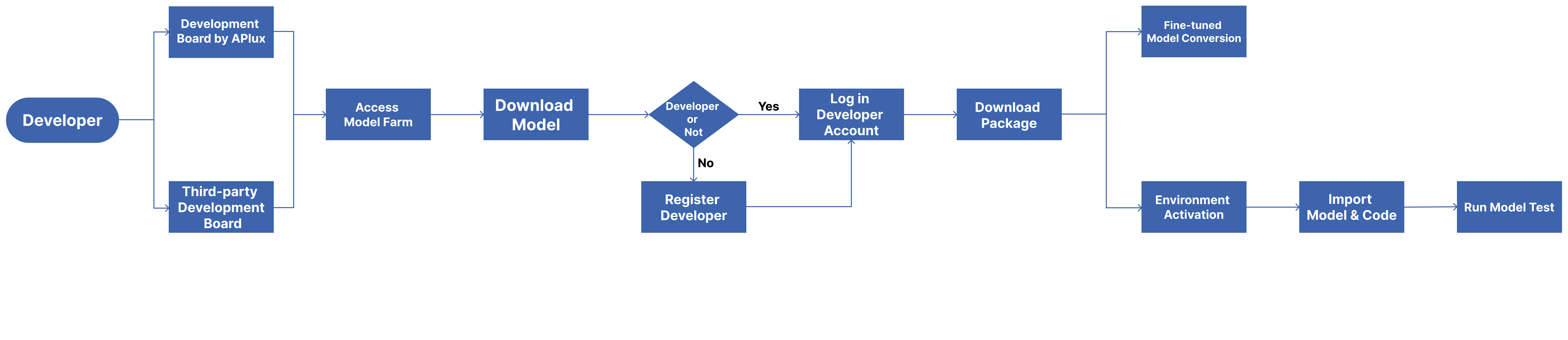
Developers go through the following steps to run AI model inference on edge devices via Model Farm:
We also provide a concrete example to help developers get started with Model Farm more quickly: Deploying the YOLOv5s Model to a Qualcomm QCS8550 Device via Model Farm
Prerequisites
Prepare the Development Board
The models provided by Model Farm have been adapted and optimized for Qualcomm Dragonwing IoT chip platforms and have undergone performance testing on development boards featuring Qualcomm chips. Model Farm currently supports the following Qualcomm chip models:
- Qualcomm QCS6490
- Qualcomm QCS8550
- IQ9075
- IQ8275
Prepare a Developer Account
Developers can browse model information and performance metrics on Model Farm without logging in.
When downloading models and example code, developers need to log in with a developer account.
- Register as an APLUX Developer
- Visit: Developer Account Registration
- Follow the prompts and requirements in the registration form to fill in the relevant developer information
- After confirming that the information is correct, submit the account creation request
Log in to Model Farm
Web Login
Visit the URL Model Farm

MMS Login
For APLUX development board users, you can also log in to Model Farm using the Model Management Service (MMS) component built into the AidLux SDK. The steps are as follows:
# Log in to Model Farm
$ mms login -u <developer_account_username> -p <developer_account_password>
A successful login will display:
Login successfully.Browse Models
Developers can search for models on Model Farm based on their needs, review detailed model information, and make quick evaluations.
Method 1: Browse via Web
Developers can visit Model Farm through a browser to browse and view model details.
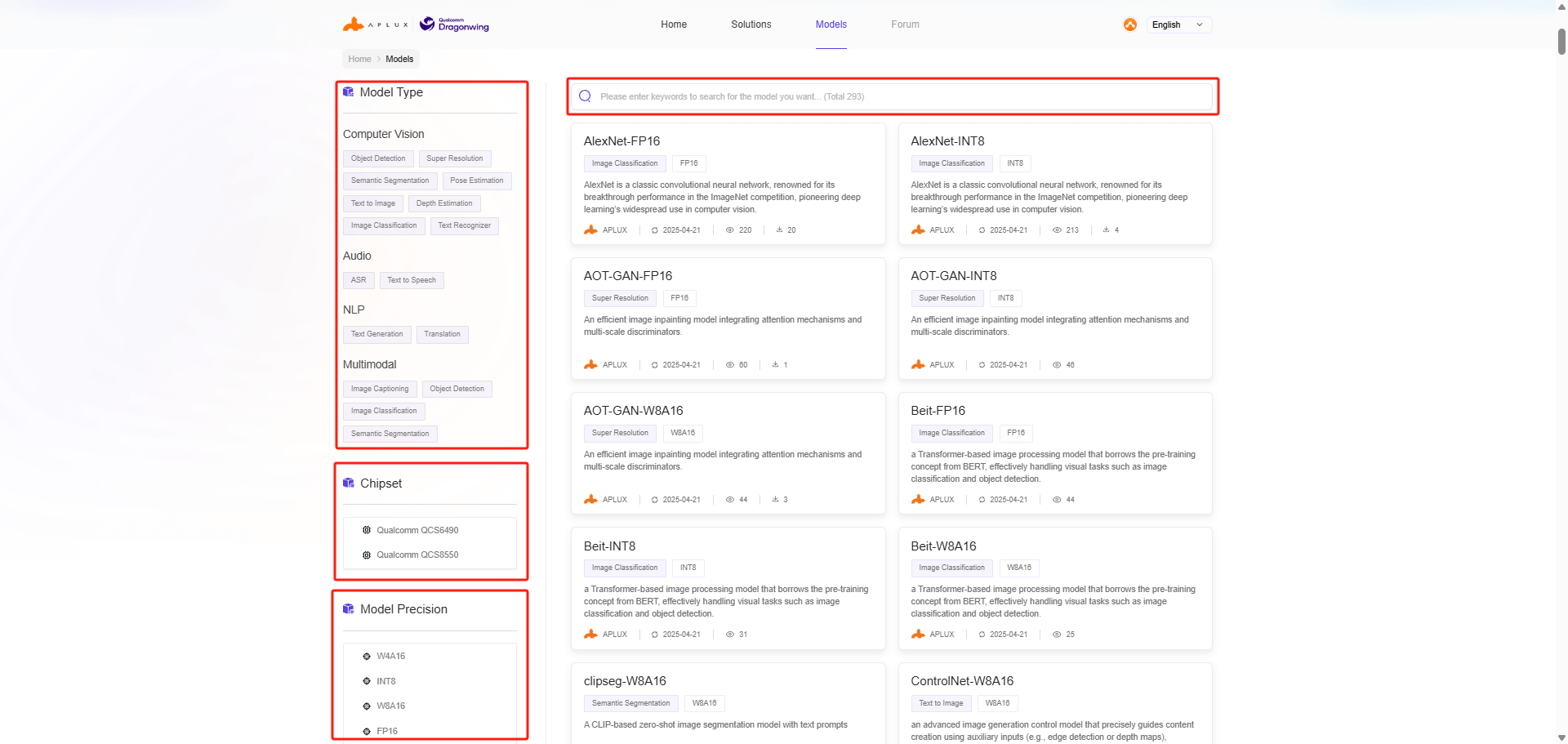
Model Farm offers multiple ways to filter and search for models:
- Filter by model type
- Filter by model data precision
- Filter by chip platform
- Keyword search
Method 2: Browse via MMS
For APLUX development board users, you can also view model information on Model Farm using the Model Management Service (MMS) component built into the AidLux SDK.
Example of searching for models using MMS:
# List all models
$ mms list# Search for models by model name
$ mms list yolo
Model Precision Chipset Backend
----- --------- ------- -------
YOLO-NAS-l FP16 Qualcomm QCS8550 QNN2.29
YOLO-NAS-l INT8 Qualcomm QCS6490 QNN2.29
YOLO-NAS-l INT8 Qualcomm QCS8550 QNN2.29
YOLO-NAS-l W8A16 Qualcomm QCS6490 QNN2.29
YOLO-NAS-l W8A16 Qualcomm QCS8550 QNN2.29
YOLO-NAS-m FP16 Qualcomm QCS8550 QNN2.29
YOLO-NAS-m INT8 Qualcomm QCS6490 QNN2.29
YOLO-NAS-m INT8 Qualcomm QCS8550 QNN2.29Download Models
Method 1: Download via Web
On the model details page, click the corresponding button in the Performance Reference section to download the model and code package.

Method 2: Download via MMS
After successfully logging in to Model Farm using the mms login command, developers can use the mms get command to download models and example code:
# Download yolov6l model with INT8 data precision, optimized for QCS8550 chip platform, using QNN2.23 inference framework
$ mms get -m yolov6l -p int8 -c qcs8550 -b qnn2.23
Downloading model from https://aiot.aidlux.com to directory: /var/opt/modelfarm_models

Downloading [yolov6l_qcs8550_qnn2.23_int8_aidlite.zip] ... done! [40.45MB in 375ms; 81.51MB/s]

Download complete!
For detailed usage instructions, refer to the output of the mms get -h command.
Model Performance Reference
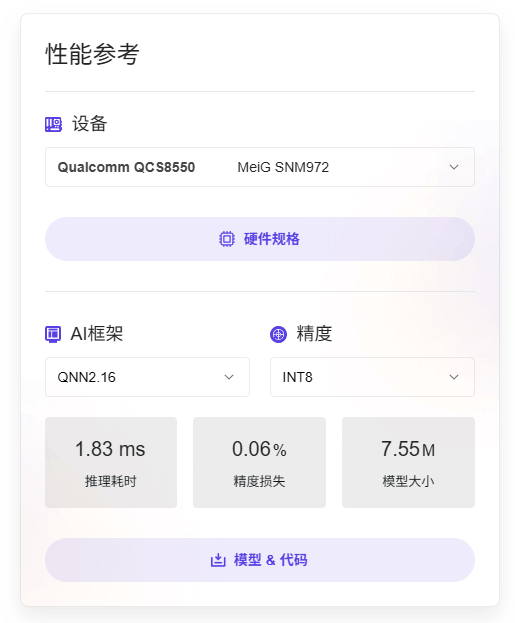
The model details page on Model Farm provides measured performance data for AI models on the corresponding hardware.
- Device: The development board model and corresponding chip model used for actual measurements
- AI Framework: The framework and version used for model conversion and inference
- Model Data Precision: The data precision used by the converted model
- Inference Latency: The actual measured latency of the model, excluding pre/post-processing
- Accuracy Loss: The cosine similarity comparison between the output matrices of the source model (FP32) and the converted model
- Model Size: The file size of the converted model
💡Note
For the same SoC chip, model performance results on different hardware specification devices should be used as reference data only.
Taking YOLOv5s on MeiG SNM972 (QCS8550) as an example:
Test Models
Models downloaded through Model Farm can be tested for inference using the following two methods:
Inference with APLUX AidLite
APLUX provides the AI Inference Framework AidLite for invoking Qualcomm NPU-based AI model inference on edge devices.
All models supported by Model Farm can perform inference through the AidLite SDK. Additionally, Model Farm provides corresponding pre/post-processing code for each model, ensuring that developers can quickly see model results.
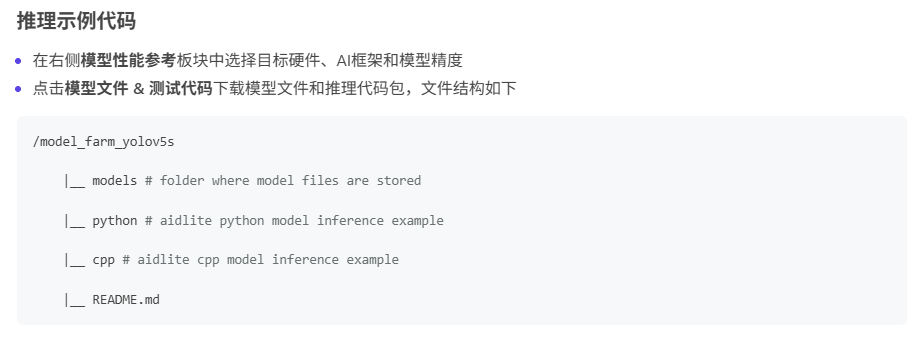
Through the Download Models step, developers can obtain a complete model file + inference code package. Its file structure is as follows (using YOLOv5s as an example):
/model_farm_yolov5s

    |__ models # Model files

    |__ python # Python-based model inference code

    |__ cpp # C++-based model inference code

    |__ README.md # Model information and software dependency installation guide
Running model test cases requires the following steps:
- Activate the development board environment: Refer to Prerequisites for activation instructions
- Install AidLite and other software environment dependencies: Refer to
README.md - Run the example: Refer to
README.md
Inference with Qualcomm QNN
Please refer to the Qualcomm QNN Documentation
Convert Fine-Tuned Models
APLUX provides the Model Optimization Platform AIMO for converting models to Qualcomm platform-specific formats.
Most models supported by Model Farm can be converted using AIMO. Based on this, Model Farm not only provides pre-converted and optimized model files but also offers reference steps for converting the model using AIMO.
AIMO model conversion reference steps can be viewed in the following two places:
- On the right side of the model details page, in the Performance Reference module, click Model Conversion Reference to access it.
- In the
README.mdfile within the code package, under the Model Conversion Reference section, click the link to access it.
For an introduction to and usage of AIMO, please refer to: Model Optimization Platform AIMO User Guide
Complete Example
YOLOv5s Model Deployment
This example demonstrates how to deploy the YOLOv5s model to a Qualcomm QCS8550 device using Model Farm.
Step 1: Visit the Website and Search for the Model
Developers can directly access Model Farm via a web browser: https://aiot.aidlux.com/en
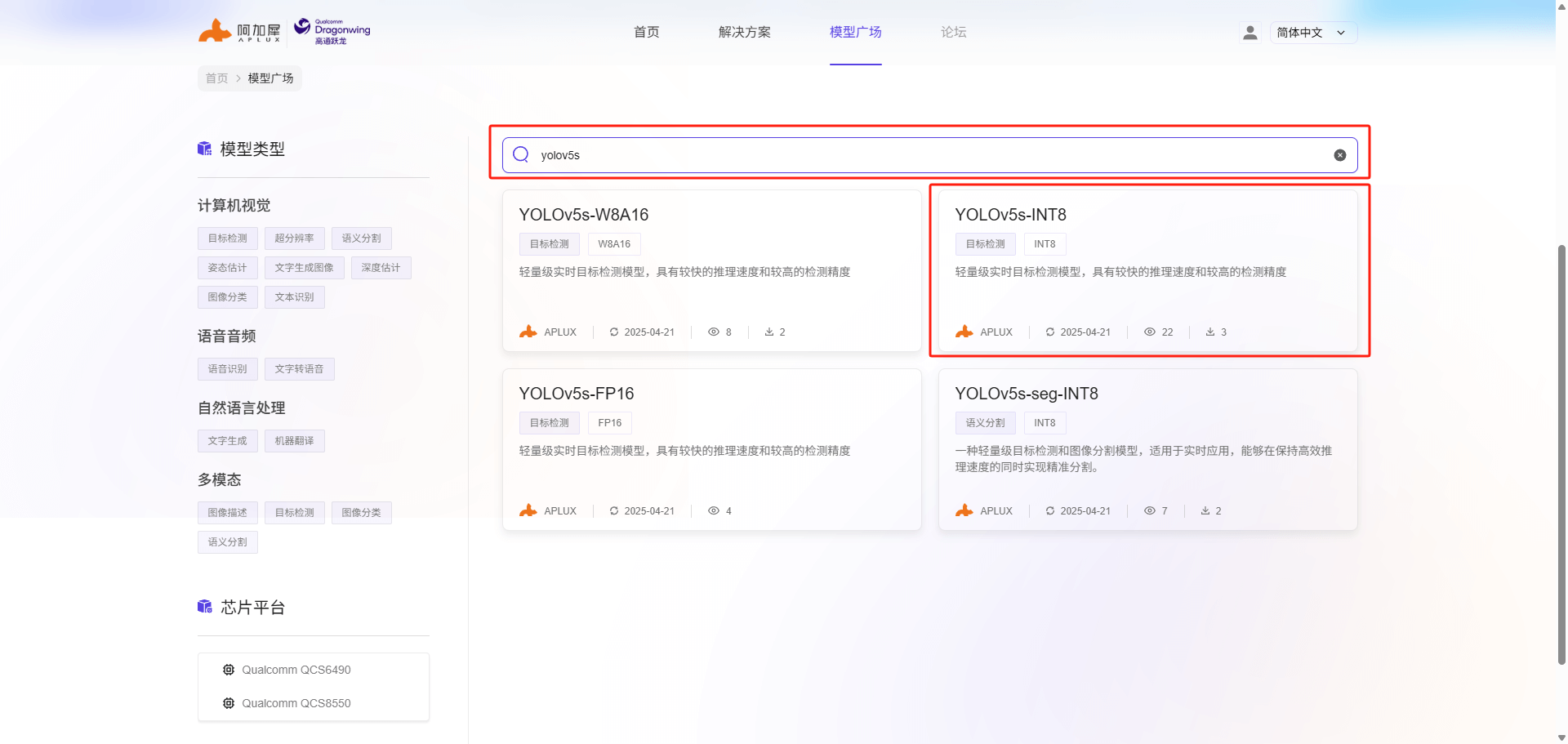
Use the search bar to directly search for the YOLOv5s model. Different quantized precision versions of YOLOv5s will appear. In this case, we will select INT8 quantization precision and click on the YOLOv5s-INT8 model card to view details.
Step 2: View Model Performance
The left side of the model details page shows the model description and related tool information, while the floating panel on the right displays the reference performance of the model on the corresponding hardware.
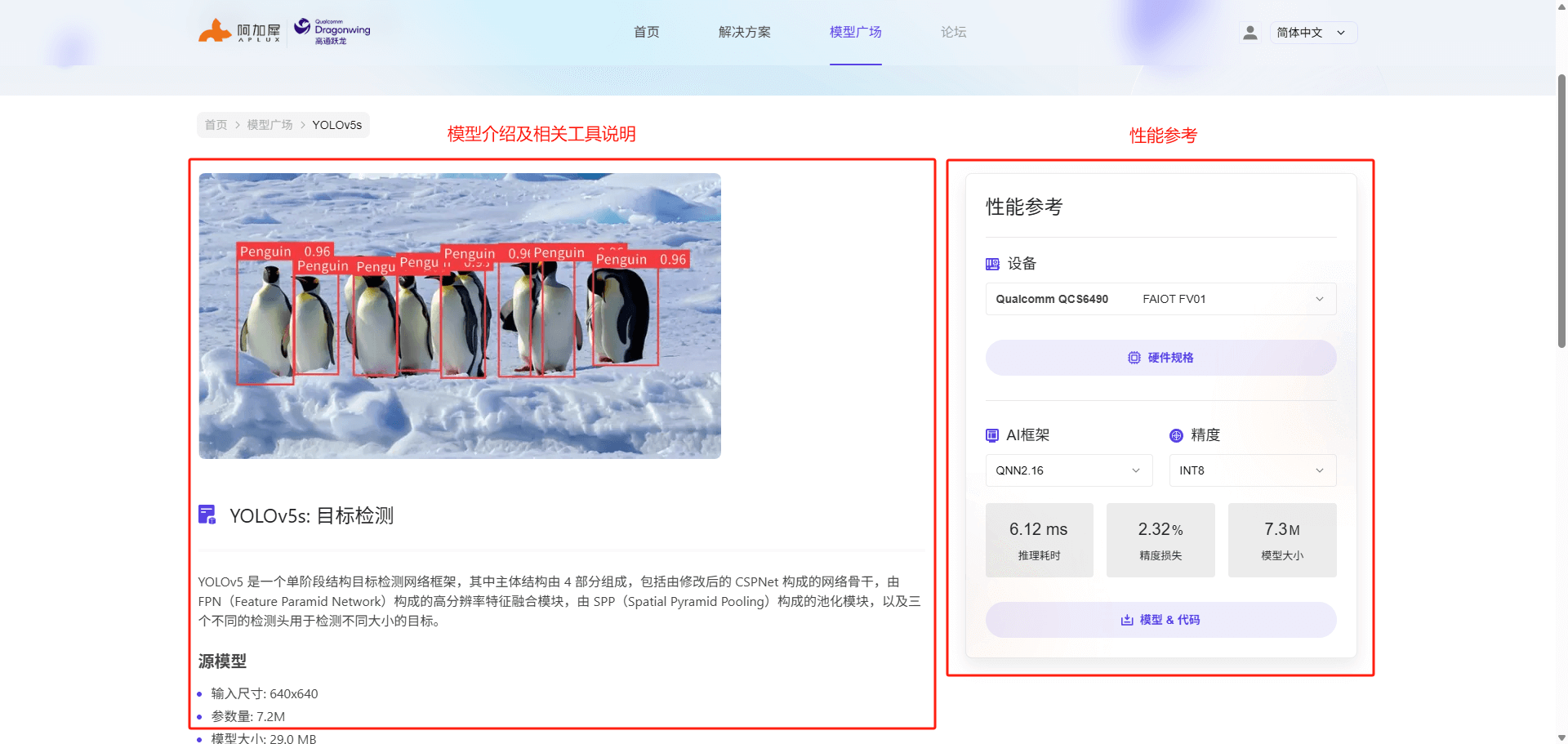
We select the MeiG SNM972 device (QCS8550) as the reference hardware and can view the performance metrics of YOLOv5s at INT8 precision on this hardware, as shown below:
💡Note
The inference latency metric refers to the time taken for model execution, excluding pre/post-processing code.
Step 3: Download the Model and Code Package
To obtain model files and inference code, developers need to register for a Model Farm developer account and log in. For specific steps, refer to: Prepare a Developer Account and Log in to Model Farm.
After logging into the developer account, click the Model & Code button to download the model files and code package.
At the same time, we can view the file structure and description of the code package in the Inference Example Code section on the model details page, as shown below:
Step 4: Import the Model & Code Package and Install Software Environment Dependencies
After preparing the hardware development board, developers can import the downloaded code package into the development board environment. For environment preparation, refer to the Prerequisites section.
Developers need to refer to the README.md file in the code package to install software dependencies for model inference. In this case, we only need to install the AidLite SDK (QNN2.16 version). For an introduction to and usage of the AidLite SDK, please refer to: AI Inference Framework AidLite
Note
There are multiple versions of AidLite SDK targeting different QNN versions. You can check the QNN version in the Performance Reference section on the model details page or in the README file.
sudo aid-pkg update
sudo aid-pkg install aidlite-sdk

# Install AidLite QNN2.16 version
sudo aid-pkg install aidlite-qnn216
After installation, verify that the AidLite SDK has been installed successfully:
# aidlite sdk c++ check
python3 -c "import aidlite; print(aidlite.get_library_version())"

# aidlite sdk python check
python3 -c "import aidlite; print(aidlite.get_py_library_version())"
Step 5: Run Model Test Cases
After the software dependencies are installed, follow the running steps in the README.md file. Developers can go into the python folder and cpp folder within the code package to run the YOLOv5s case using different programming languages.
Step 6: Convert Custom Fine-Tuned Models and Run Inference
When developers want to test the performance of their own fine-tuned YOLOv5s model on QCS8550, Model Farm provides reference steps for converting YOLOv5s using AIMO.
AIMO model conversion reference steps can be viewed in the following two places:
- On the right side of the model details page, in the Performance Reference module, click Model Conversion Reference to access it.