Model Farm Preview User Guide
Overview
Model Farm proactively adapts cutting-edge or popular AI models. To give developers early insight into the model adaptation release schedule and related model performance parameters, we have launched Model Farm Preview.
Model Farm Preview shares the same usage methods and unified interface interactions as Model Farm. Developers can quickly view the performance parameters of upcoming models on Model Farm, or get support by contacting APLUX to obtain relevant model files and inference code in advance.
💡Note
Model Farm Preview is only for viewing model adaptation status and related performance parameters. Models cannot be downloaded or used until they are officially released in Model Farm.
Quick Start
Model Farm Preview is only for previewing model-related performance parameters and cannot be used for downloading. Therefore, developers can access all information on the page without logging in.
System Dependency Configuration
Configure the AidLux Package Source
# Download the correct public key
sudo wget -O- https://archive.aidlux.com/ubuntu24/public.key | gpg --dearmor | sudo tee /etc/apt/trusted.gpg.d/private-aidlux.gpg > /dev/null

# Edit the source list file
sudo vim /etc/apt/sources.list.d/private-aidlux.list

# Add the repository provided by AidLux to the source file
deb [arch=arm64 signed-by=/etc/apt/trusted.gpg.d/private-aidlux.gpg] https://archive.aidlux.com/ubuntu24 noble main

# Update the package cache
sudo apt update
After the update is complete, you can use the following command to retrieve the official AidLux SDK dependencies:
sudo apt list | grep aid | grep unknown# Install software
# Must be installed first (not included with the system)
sudo apt install python3 python3-pip libopencv-dev python3-opencv net-tools
# Must be installed before aidlite
sudo apt install aidlux-aistack-base aidrtcm
# Install aidlite and dependencies
sudo apt install aid-lms aidlms-sdk aidlite-sdk cmake
sudo apt-get install libfmt-dev nlohmann-json3-dev
sudo apt install aidlite-*
# DSP support
sudo apt-get install qcom-fastrpc1
sudo apt-get install qcom-fastrpc-dev
# Install aidgen-sdk
sudo apt install aidgen-qnn240-sdk
# Install mms service
sudo apt install aid-mms
# GPU support
sudo add-apt-repository ppa:ubuntu-qcom-iot/qcom-noble-ppa
sudo apt install qcom-adreno-cl1
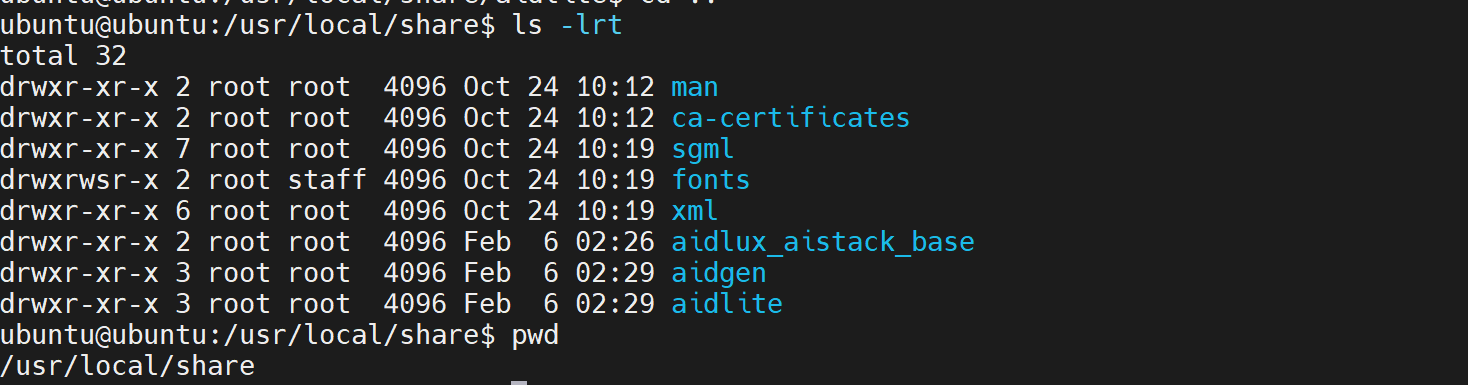
sudo ln -s /usr/lib/aarch64-linux-gnu/libOpenCL.so.1 /usr/lib/aarch64-linux-gnu/libOpenCL.soAfter installation, check that the aidlite and aidgen directories have been added under /usr/local/share:
Device Authorization
Obtain the Device Serial Number
cat /sys/devices/soc0/serial_numberObtain the License File
Provide the serial number to APLUX technical staff to generate a device-specific License file, then place it in the /etc/opt/aidlux/license/AidLuxLics directory.
Access the Model Farm Preview Page
Developers can click the link to directly access the Model Farm Preview interface: Model Farm Preview
Developers can also enter the Model Farm Preview interface through the Model Farm interface interaction:

Browse Models
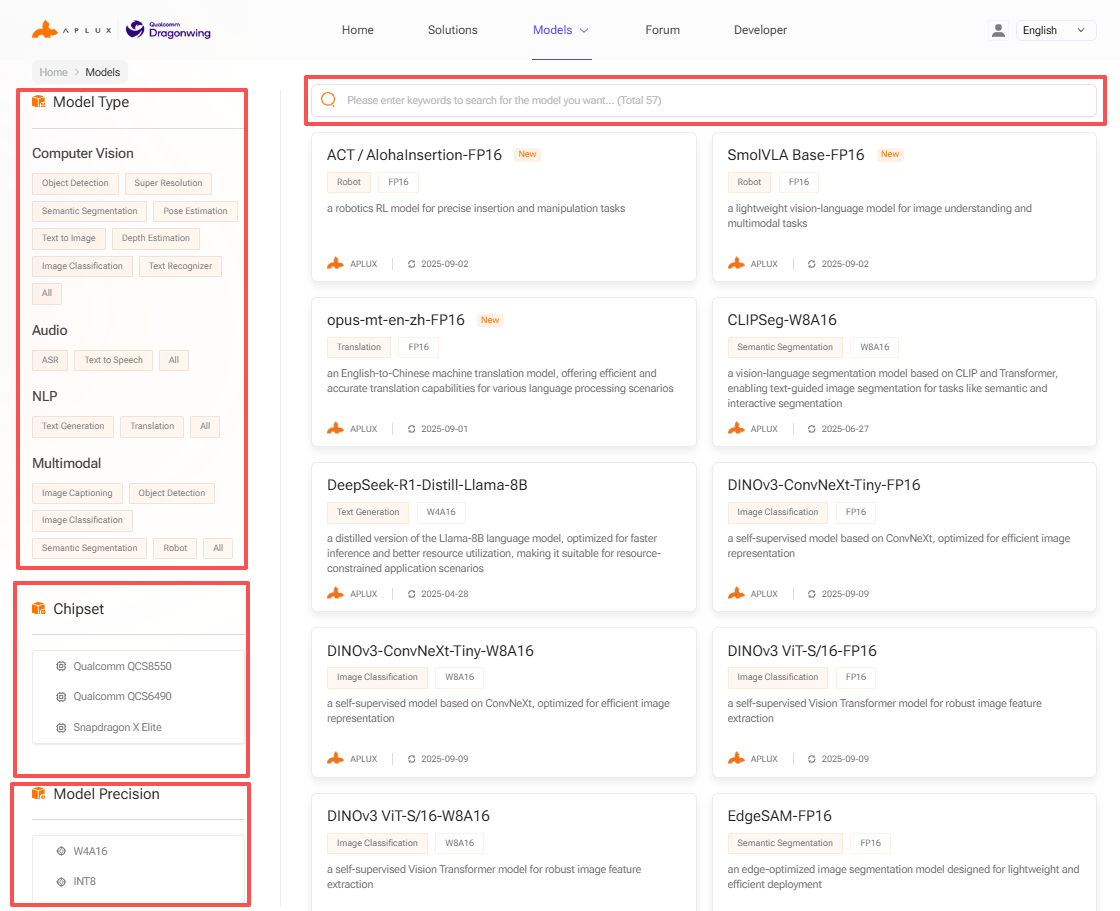
Developers can search for models on Model Farm Preview based on their needs, review detailed model information, and make quick evaluations.
Model Farm Preview offers multiple ways to filter and search for models:
- Filter by model type
- Filter by model data precision
- Filter by chip platform
- Keyword search
Model Performance Reference
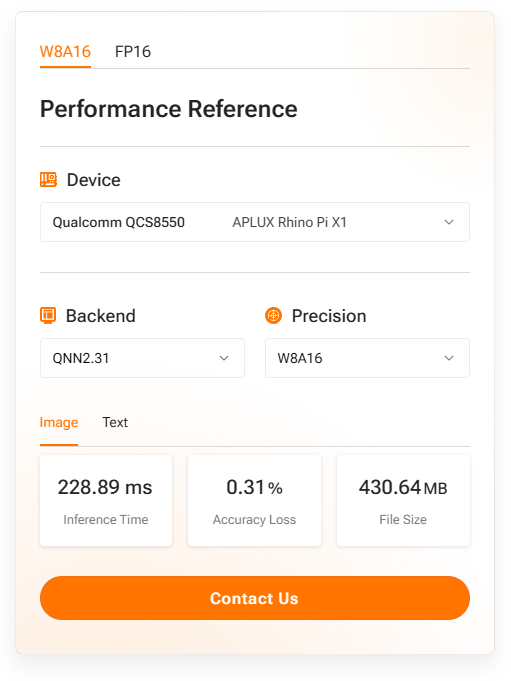
The model details page on Model Farm Preview provides measured performance data for AI models on the corresponding hardware:
- Device: The development board model and corresponding chip model used for actual measurements
- AI Framework: The framework and version used for model conversion and inference
- Model Data Precision: The data precision used by the converted model
- Inference Latency: The actual measured latency of the model, excluding pre/post-processing
- Accuracy Loss: The cosine similarity comparison between the output matrices of the source model (FP32) and the converted model
- Model Size: The file size of the converted model
💡Note
For the same SoC chip, model performance results on different hardware specification devices should be used as reference data only.
Taking SigLIP-so400m on MeiG SNM972 (QCS8550) as an example:
Obtain Model Files and Code in Advance
Models in the Model Farm Preview section do not support web downloads. Developers can download Preview models on APLUX development boards using the mms command. Here is an example using MobileClip2-S3:
- Log in via
mms
mms login

# Enter your username:
# Enter your password:

# After entering the correct credentials, you will see:
# Login successfully.- Search for models
mms list mobileclip # Supports keyword search

# You will see output similar to:
Model           Precision  Chipset           Backend
-----           ---------  -------           -------
MobileClip-S2   FP16       Qualcomm QCS8550  QNN2.31
MobileClip2-S3  FP16       Qualcomm QCS8550  QNN2.36