YOLOv5 Deployment
Introduction
YOLOv5 is a single-stage object detection framework. Its main architecture consists of four parts: a network backbone built on a modified CSPNet, a high-resolution feature fusion module based on FPN (Feature Pyramid Network), a pooling module based on SPP (Spatial Pyramid Pooling), and three detection heads for objects of different sizes.
This chapter demonstrates how to deploy, load, and run YOLOv5s on edge devices. Two deployment methods are provided:
- AidLite Python API
- AidLite C++ API
In this example, model inference runs on the device-side NPU, and the code calls the related interfaces to process user input and return results.
- Device: IQ9075
- System: Ubuntu 24.04
- Source model: YOLOv5s
- Quantized precision: INT8
- Model Farm reference: YOLOv5s-INT8
Supported Platforms
| Platform | Running Mode |
|---|---|
| IQ9075 | Ubuntu 24.04 |
Prerequisites
- IQ9075 hardware
- Ubuntu 24.04 system
System Dependency Configuration
Configure AidLux Dependency Sources
# Download the correct public key
sudo wget -O- https://archive.aidlux.com/ubuntu24/public.key | gpg --dearmor | sudo tee /etc/apt/trusted.gpg.d/private-aidlux.gpg > /dev/null

# Edit the source file
sudo vim /etc/apt/sources.list.d/private-aidlux.list

# Fill in the private repository provided by AidLux
deb [arch=arm64 signed-by=/etc/apt/trusted.gpg.d/private-aidlux.gpg] https://archive.aidlux.com/ubuntu24 noble main

# Update cache
sudo apt update
After the update is complete, you can query the official AidLux SDK packages with the following command:
sudo apt list | grep aid | grep unknown# Install software
# Required packages not included by default
sudo apt install python3 python3-pip libopencv-dev python3-opencv net-tools
# Must be installed before aidlite
sudo apt install aidlux-aistack-base aidrtcm
# Install aidlite and dependencies
sudo apt install aid-lms aidlms-sdk aidlite-sdk cmake
sudo apt-get install libfmt-dev nlohmann-json3-dev
sudo apt install aidlite-*
# DSP support
sudo apt-get install qcom-fastrpc1
sudo apt-get install qcom-fastrpc-dev
# Install aidgen-sdk
sudo apt install aidgen-qnn240-sdk
# Install mms service
sudo apt install aid-mms
# GPU support
sudo apt-add-repository -s ppa:ubuntu-qcom-iot/qcom-ppa
sudo apt install qcom-adreno-cl1
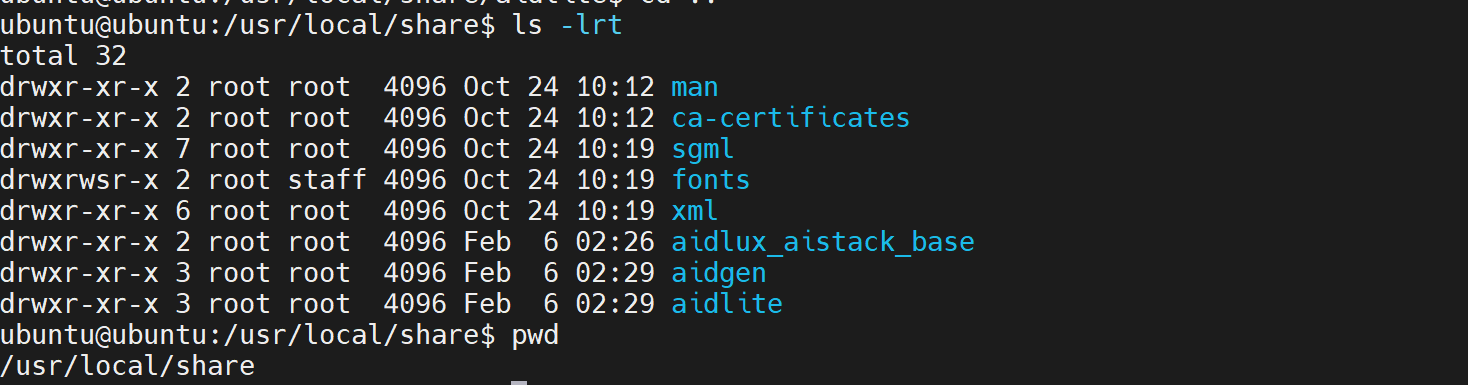
sudo ln -s /usr/lib/aarch64-linux-gnu/libOpenCL.so.1 /usr/lib/aarch64-linux-gnu/libOpenCL.soAfter installation, verify that the aidlite and aidgen directories have been added under /usr/local/share.
Device Authorization
Obtain the Device SN
cat /sys/devices/soc0/serial_numberObtain the License File
Provide the SN to AidLux technical support so they can generate a device-specific license file, then place it under /etc/opt/aidlux/license/AidLuxLics.
Activate the License
sudo /opt/aidlux/cpf/aid-lms/manager.sh restartDownload YOLOv5s-INT8 Model Resources
mms list yolov5s

#------------------------ Available YOLOv5s models ------------------------
Model        Precision  Chipset           Backend
-----        ---------  -------           -------
YOLOv5s      INT8       Qualcomm QCS6490  QNN2.31
YOLOv5s      INT8       Qualcomm QCS8550  QNN2.31
YOLOv5s      FP16       Qualcomm QCS8550  QNN2.31
YOLOv5s      W8A16      Qualcomm QCS6490  QNN2.31
YOLOv5s      W8A16      Qualcomm QCS8550  QNN2.31
YOLOv5s-seg  INT8       Qualcomm QCS8550  QNN2.16
YOLOv5s-seg  INT8       Qualcomm QCS6490  QNN2.31

# Download YOLOv5s-int8
mms get -m YOLOv5s -p int8 -c qcs8550 -b qnn2.31 -d /home/ubuntu/yolov5s
cd /home/ubuntu/yolov5s

# Extract the model package
unzip YOLOv5s_qcs8550_w8a8.zip
💡Note
You can also search for and download the model from the Model Farm website.
Install the AidLite SDK
You can also follow the
README.mdfile in the model package to install the SDK.
- Ensure the QNN backend version is
>= 2.31. - Ensure the versions of
aidlite-sdkandaidlite-qnnxxxare2.3.x.
# Check AidLite and QNN versions
dpkg -l | grep aidlite
#------------------------ Example output ------------------------
ii  aidlite-qnn236       2.3.0.230         arm64        aidlux aidlite qnn236 backend plugin
ii  aidlite-sdk          2.3.0.230         arm64        aidlux inference module sdk
Update QNN and AidLite when needed:
# Install the AidLite SDK
sudo apt update
sudo apt install aidlite-sdk
sudo apt install aidlite-qnn236

# Check the AidLite C++ library version
python3 -c "import aidlite; print(aidlite.get_library_version())"

# Check the AidLite Python library version
python3 -c "import aidlite; print(aidlite.get_py_library_version())"
AidLite Python API Deployment
Run the Python API Example
cd /home/ubuntu/yolov5s/code

# --target_model: model file path
# --imgs: input image
# --invoke_nums: number of loops
python3 python/run_test.py --target_model /home/ubuntu/yolov5s/models/QCS8550/W8A8/cutoff_yolov5s_qcs8550_w8a8.qnn231.ctx.bin --imgs ./python/bus.jpg --invoke_nums 10
The terminal prints model inference latency in milliseconds together with the detection results:
=======================================
QNN inference 10 times :
 --mean_invoke_time is 1.5697240829467773
 --max_invoke_time is 2.2764205932617188
 --min_invoke_time is 1.477956771850586
 --var_invoketime is 0.05570707855895307
=======================================
Detected 5 regions
1 [668, 385, 141, 500] 0.86635846 person
2 [219, 407, 125, 465] 0.86257815 person
3 [55, 393, 178, 515] 0.845101 person
4 [3, 207, 812, 601] 0.8401416 bus
5 [0, 551, 73, 325] 0.5058796 person
Image saved at ./python/yolov5s_result.jpg
=======================================
AidLite C++ API Deployment
Run the C++ API Example
cd /home/ubuntu/yolov5s/code/cpp

mkdir build && cd build
cmake ..
make
./run_yolov5
The terminal prints model inference latency in milliseconds together with the detection results.
The C++ example runs inference 10 times by default.
current thread_idx[1] [9] get_output_tensor cost time : 0.911757
repeat [10] time , input[21.061591] --- invoke[16.763899] --- output[16.023339] --- sum[53.848829]ms
postprocess cost time : 0.158227 ms
Result id[0]-x1[209.905304]-y1[242.500031]-x2[284.438965]-y2[518.384033]
Verify result : idx[0] id[0] coverage_ratio[0.983873]
Result id[0]-x1[105.769806]-y1[228.641464]-x2[234.684357]-y2[546.474487]
Verify result : idx[0] id[0] coverage_ratio[0.129211]
Verify result : idx[1] id[0] coverage_ratio[0.000000]
Verify result : idx[2] id[0] coverage_ratio[0.934018]
Result id[0]-x1[474.906281]-y1[228.192184]-x2[558.729797]-y2[524.893982]
Verify result : idx[0] id[0] coverage_ratio[0.000000]
Verify result : idx[1] id[0] coverage_ratio[0.952345]
Result id[5]-x1[81.684174]-y1[122.895874]-x2[562.999390]-y2[479.283447]
Verify result : idx[0] id[5] coverage_ratio[0.893258]
The result image result.jpg is saved in the build directory.